

In today’s hyper-connected world, a strong internet connection is no longer a luxury, it’s a daily necessity. From streaming 4K movies and online gaming to remote work and smart home control, everything depends on fast and stable Wi-Fi. That’s exactly where the best Wi-Fi routers in 2026 come in to improve your daily digital experience.
However, choosing the right router can be overwhelming. With Wi-Fi 6, Wi-Fi 6E, and Wi-Fi 7 technologies all competing, users often struggle to understand which option truly fits their needs. On top of that, every home is different; some need powerful coverage for large houses, while others prioritize low-latency performance for gaming or smooth connectivity for work-from-home setups. Fortunately, this guide simplifies the decision for you. We’ve carefully analyzed and compared performance, coverage range, stability, speed, and overall value. After thorough evaluation, we selected the best routers that deliver reliable performance across different use cases and budgets.
Whether you’re using Spectrum, Xfinity, or any other ISP, the right router can significantly upgrade your internet experience. So, let’s explore the best Wi-Fi routers in 2026 and help you find the perfect match for your home or office needs.
| Best Overall | Best for Gaming | Best Budget |
| TP-Link Deco X55 AX3000 Mesh System | TP-Link Archer AXE75 WiFi 6E Router | TP-Link AX1800 Archer AX21 |
 |  |  |
| Excellent whole-home coverage (up to 6500 sq ft), stable WiFi 6 performance, easy setup & strong value for money. | Ultra-low latency, 6GHz band support, strong multi-device handling for lag-free gaming and streaming. | Affordable yet reliable WiFi 6 router with smooth performance for daily use and small homes. |
| $149.98 | $154.95 | $59.99 |
You Might Be Interested In
- 10 Best WiFi Extenders 2026: Signal Booster for Home
- 15 Best Desktop Computers in 2026 for All Users & Budgets
8 Best Wi-Fi Routers in 2026, Expert Tested
Fast, stable, and future-ready internet is no longer optional in 2026—it’s a daily need for streaming, gaming, remote work, and smart homes. With so many options available, picking the right router can feel confusing. That’s why we tested and reviewed the most popular models to bring you clear, honest, and performance-focused recommendations you can trust before making a smart buying decision.
| Router | Type | Speed and Coverage | Best For | Price |
| TP-Link Archer AX21 | WiFi 6 | 1.8 Gbps Medium | Budget Home Use | $59.99 |
| TP-Link Deco X55 (3-Pack) | Mesh WiFi 6 | 3.0 Gbps6500 sq ft | Large Homes | $149.98 |
| TP-Link Deco 7 BE25 | WiFi 7 Mesh | 5.0 Gbps 2600 sq ft | Future-Proof Homes | $119.99 |
| TP-Link Archer BE230 | WiFi 7 | 3.6 Gbps Large | Power Users | $86.97 |
| ASUS RT-AX1800S | WiFi 6 | 1.8 Gbps Medium | Security & VPN | $69.99 |
| NETGEAR R6700AX | WiFi 6 | 1.8 Gbps 1500 sq ft | Small Homes | $69.99 |
| TP-Link Archer AXE75 | WiFi 6E | 5.4 Gbps Large | Gaming | $154.95 |
| Amazon eero 7 | WiFi 7 Mesh | 2.5 Gbps 2000 sq ft | Smart Homes | $169.99 |
1. TP-Link AX1800 Archer AX21

Best Budget Wi-Fi 6 Router
The TP-Link AX1800 Archer AX21 is one of the most popular picks in the best Wi-Fi routers 2026 category, especially for users who want reliable performance without spending too much. Moreover, it is widely recommended for best routers for home, best routers for wifi, and even best routers for spectrum setups due to its stable compatibility.
In addition, this router uses Wi-Fi 6 technology, which improves speed, reduces congestion, and supports multiple devices at once. So, whether you are streaming Netflix in HD, attending online classes, or browsing casually, it delivers smooth performance without hiccups. Furthermore, the EasyMesh support allows you to expand coverage later, which is a big plus for growing households.
However, it is not designed for ultra-heavy gaming or extremely large homes. Still, for its price range, it feels like a bang for your buck solution.
Key Specifications
- Wi-Fi 6 (AX1800)
- Dual-band (2.4GHz + 5GHz)
- Up to 1.8 Gbps speed
- 4 high-gain antennas
- Gigabit Ethernet ports
- EasyMesh support
Core Features
- OFDMA technology for multiple devices
- Beamforming for stronger signal focus
- WPA3 security protection
- Alexa compatibility
- Easy setup via TP-Link Tether app
Reasons to Buy
- Very affordable price point
- Reliable everyday performance
- Easy installation for beginners
- Good coverage for small/medium homes
- Strong best Wi-Fi routers reviews reputation
What to Consider
- Not ideal for professional gaming setups
- Limited advanced customization features
- Coverage may need extension in large homes
Best For
- Small apartments and family homes
- Students and remote workers
- Budget-conscious buyers
- Basic streaming and browsing
Price: $59.99
2. TP-Link Deco X55 AX3000 Mesh System

Best for Large Homes
The TP-Link Deco X55 AX3000 Mesh System is one of the strongest contenders in the 8 Best Wi-Fi Routers in 2026 lineup, especially for users who need full-home coverage. Moreover, it is widely recognized among the best Wi-Fi routers for large homes and top rated home routers because it eliminates dead zones with ease.
In addition, this system uses a mesh setup, meaning multiple units work together like a single powerful network. So, as you move from room to room, your connection stays stable without drops. Furthermore, it supports Wi-Fi 6 technology, which improves speed, reduces lag, and handles many devices at once.
However, its real strength lies in coverage. With up to 6500 sq. ft. support (3-pack), it easily handles multi-story homes. Therefore, it is ideal for families who stream, game, and work online simultaneously.
Key Specifications
- Wi-Fi 6 (AX3000)
- Mesh system (3-pack)
- Coverage up to 6500 sq. ft.
- 3 Gigabit ports per unit
- Supports Ethernet backhaul
- Up to 150+ devices
Core Features
- AI-driven mesh optimization
- Seamless roaming (no manual switching)
- OFDMA + MU-MIMO support
- TP-Link HomeShield security
- Easy setup via Deco app
Reasons to Buy
- Excellent for large or multi-floor homes
- No Wi-Fi dead zones
- Stable performance under heavy usage
- Easy expansion with more Deco units
- Strong reputation in best routers reviews
What to Consider
- Higher cost than single routers
- Requires multiple units for full benefit
- Slight setup learning curve for beginners
Best For
- Large families
- Multi-story houses
- Smart homes with many devices
- Streaming and remote work setups
- Users searching best routers for home coverage
Price: $149.98
3. TP-Link Deco 7 BE25 Dual-Band BE5000 WiFi 7 Mesh Wi-Fi Router

Best Affordable Wi-Fi 7 Mesh Router
The TP-Link Deco BE25 is one of the most talked-about devices in the 8 Best Wi-Fi Routers in 2026 lineup because it brings Wi-Fi 7 performance at a budget-friendly price. Moreover, it is often highlighted in discussions about best routers for home, especially for users upgrading from Wi-Fi 6 systems.
In addition, this router uses a dual-band Wi-Fi 7 mesh system, which combines 2.4 GHz and 5 GHz bands intelligently using Multi-Link Operation (MLO). So, you get lower latency, smoother streaming, and better stability even when many devices are connected. Furthermore, each unit includes 2.5G ports, which allow faster wired backhaul and future-proof connectivity.
However, it’s important to note that it does not include a 6 GHz band, which some premium Wi-Fi 7 systems offer. Still, for most households, this does not significantly impact everyday performance. In fact, many users consider it a “sweet spot” between cost and next-gen features.
Key Specifications
- Wi-Fi 7 (BE5000 class)
- Dual-band (2.4 GHz + 5 GHz)
- Up to 5 Gbps theoretical speed
- 2× 2.5G Ethernet ports per unit
- Mesh coverage up to ~2600 sq. ft per unit
- Supports 150+ connected devices
Core Features
- Multi-Link Operation (MLO) for reduced latency
- AI-driven seamless roaming
- 4K-QAM for higher data efficiency
- TP-Link HomeShield security suite
- Wired + wireless backhaul support
- App-based easy setup and control
Reasons to Buy
- Affordable entry into Wi-Fi 7 routers
- Strong performance for streaming and gaming
- Great upgrade from Wi-Fi 5/6 systems
- Easy expansion with mesh units
- Excellent value in best routers reviews
What to Consider
- No 6 GHz band support
- Not ideal for extreme enterprise setups
- Coverage depends on mesh expansion
Best For
- Budget-conscious tech upgraders
- Medium to large homes using mesh
- Smart home users with many devices
- Families wanting stable whole-home Wi-Fi
- Users searching best routers for wifi upgrades
Price: $119.99
4. TP-Link Dual-Band BE3600 Wi-Fi 7 Router Archer BE230

Best Value Wi-Fi 7 Router
The TP-Link Archer BE230 is one of the most talked-about entries in the 8 Best Wi-Fi Routers in 2026 lineup because it brings Wi-Fi 7 technology at an affordable price point. Moreover, it is widely considered among the best routers for wifi upgrades for users moving beyond Wi-Fi 6.
In addition, this router delivers a combined speed of up to 3.6 Gbps, making it ideal for 4K streaming, online gaming, and heavy multitasking. So, even households with multiple smart devices can enjoy stable connectivity. Furthermore, its dual 2.5G ports remove the traditional gigabit bottleneck, which is a big advantage for high-speed internet plans.
However, it is important to note that this is a dual-band Wi-Fi 7 router, meaning it does not include the 6 GHz band found in premium models. Still, thanks to Multi-Link Operation (MLO) and advanced signal optimization, performance remains strong for most users.
Key Specifications
- Wi-Fi 7 (BE3600 class)
- Dual-band (2.4 GHz + 5 GHz)
- Up to 3.6 Gbps combined speed
- 1× 2.5G WAN port + 1× 2.5G LAN port
- 3× Gigabit LAN ports
- USB 3.0 support
- Quad-core processor (2.0 GHz class)
Core Features
- Multi-Link Operation (MLO) for lower latency
- 4K-QAM for higher data efficiency
- EasyMesh support for expansion
- Beamforming for stronger signal focus
- TP-Link HomeShield security suite
- VPN server/client support
Reasons to Buy
- Affordable entry into Wi-Fi 7 routers
- Excellent speed for streaming and gaming
- Future-ready 2.5G ports
- Strong value in best routers reviews
- Easy setup for beginners
What to Consider
- No 6 GHz band support
- Coverage best for medium-sized homes
- Not a full premium gaming router
Best For
- Budget Wi-Fi 7 upgraders
- Small to medium homes
- Streaming and gaming users
- Smart home setups
- Users searching best routers for home performance upgrades
Price: $86.97
5. ASUS RT-AX1800S Dual Band WiFi 6 Extendable Router
Best Home Office Wi-Fi Router
The ASUS RT-AX1800S earns its place in the 8 Best Wi-Fi Routers in 2026 list as a dependable choice for home offices and everyday users. Moreover, it is frequently listed among the best routers for home and top rated home routers due to its stable performance and strong security features.
In addition, this router delivers Wi-Fi 6 speeds of up to 1800 Mbps, which is more than enough for video conferencing, cloud work, and streaming. So, remote workers can enjoy smooth performance without annoying interruptions. Furthermore, ASUS includes AiProtection powered by Trend Micro, which adds enterprise-grade security without any subscription cost.
However, it is not the fastest router in this lineup. Still, it focuses more on stability and reliability rather than raw speed.
Key Specifications
- Wi-Fi 6 (AX1800 class)
- Dual-band (2.4 GHz + 5 GHz)
- Up to 1201 Mbps (5 GHz) + 574 Mbps (2.4 GHz)
- 1× Gigabit WAN + 3× Gigabit LAN ports
- 256 MB RAM / 128 MB flash
- AiMesh support
Core Features
- AiProtection Classic security (Trend Micro)
- Built-in VPN server and client support
- MU-MIMO + OFDMA for efficiency
- Parental controls
- AiMesh expandable network support
- Easy setup via ASUS Router app
Reasons to Buy
- Strong security without extra cost
- Reliable performance for work-from-home users
- Stable video conferencing and browsing
- Easy mesh expansion with ASUS ecosystem
- Good value in best routers reviews
What to Consider
- Not ideal for heavy competitive gaming
- Limited advanced speed compared to Wi-Fi 6E/7 routers
- Best suited for small to medium homes
Best For
- Home office professionals
- Remote workers and freelancers
- Small families
- Users needing stable daily connectivity
- Those searching best home office router
Price: $69.99
6. NETGEAR WiFi 6 Router 4-Stream (R6700AX)
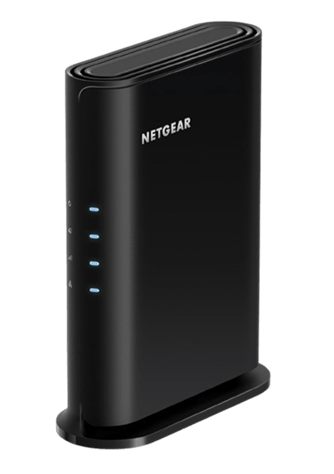
Best Compact Wi-Fi 6 Router for Small Homes
The NETGEAR R6700AX is a solid entry in the 8 Best Wi-Fi Routers in 2026 list, especially for users who want dependable performance in a compact design. Moreover, it is frequently mentioned among the best routers for home and best routers for wifi setups for apartments and small households.
In addition, this router delivers AX1800 Wi-Fi 6 performance, meaning it can handle modern streaming, browsing, and video calls with ease. So, everyday users get a stable and smooth online experience without paying premium prices. Furthermore, it supports up to 20 connected devices, making it suitable for small families or shared apartments.
However, it is important to note that this router is designed for small to medium spaces (around 1,500 sq. ft.). Still, within that range, performance remains consistent and reliable.
Key Specifications
- Wi-Fi 6 (AX1800 class)
- Dual-band (2.4 GHz + 5 GHz)
- Up to 1.8 Gbps total speed
- Coverage up to ~1,500 sq. ft.
- Supports ~20 connected devices
- 4 Gigabit LAN ports + 1 WAN port
- WPA3 security support
Core Features
- Dual-band Wi-Fi 6 performance
- NETGEAR Armor security (optional subscription)
- Smart Parental Controls
- Built-in VPN support
- Nighthawk mobile app control
- Automatic firmware updates
Reasons to Buy
- Easy setup for beginners
- Stable performance for daily use
- Good coverage for apartments
- Strong security features
- Reliable brand reputation in best routers reviews
What to Consider
- Not ideal for large homes or heavy gaming
- Advanced features require subscriptions
- Limited scalability compared to mesh systems
Best For
- Small apartments and homes
- Students and casual users
- Budget-friendly setups
- Basic streaming and browsing
- Users searching best routers for spectrum basic plans
Price: $69.99
7. TP-Link AXE5400 Tri-Band WiFi 6E Router

Best Wi-Fi 6E Gaming Router
The TP-Link AXE5400 Tri-Band WiFi 6E Router is a standout model in the 8 Best Wi-Fi Routers in 2026 list, especially for users who want high-speed gaming performance without jumping to Wi-Fi 7 prices. Moreover, it is often ranked among the best routers for gaming due to its ultra-low latency potential and strong 6 GHz band performance.
In addition, this router uses Wi-Fi 6E technology, which adds a dedicated 6 GHz band alongside 2.4 GHz and 5 GHz. So, it reduces congestion and improves responsiveness for competitive gaming and 4K streaming. Furthermore, with speeds up to AXE5400, it handles multiple devices smoothly, even in busy households.
However, it is important to note that the 6 GHz band has a shorter range and works best in close proximity. Still, when used correctly, it delivers extremely fast and stable connections.
Key Specifications
- Wi-Fi 6E (AXE5400)
- Tri-band: 2.4 GHz + 5 GHz + 6 GHz
- Up to 5.4 Gbps total speed
- 160 MHz channel support
- 1× USB 3.0 port
- 4× Gigabit LAN ports + 1× WAN port
- Quad-core processor
Core Features
- Dedicated 6 GHz band for low congestion
- OFDMA + MU-MIMO support
- OneMesh compatibility for expansion
- VPN server and client support
- WPA3 advanced security
- Game-optimized low latency performance
Reasons to Buy
- Excellent for best routers for gaming needs
- Strong performance for streaming and downloads
- Future-ready Wi-Fi 6E technology
- Stable multi-device handling
- Frequently praised in best routers review
What to Consider
- 6 GHz range is shorter than other bands
- Not as future-proof as Wi-Fi 7 routers
- Best performance requires close-range setup
Best For
- Gamers and streamers
- Tech-savvy households
- Medium to large homes
- Users upgrading from Wi-Fi 5/6
- Those seeking low-latency performance
Price: $154.95
8. Amazon eero 7 dual-band mesh Wi-Fi 7 router

Best Easy-Setup Wi-Fi 7 Mesh Router
The Amazon eero 7 closes out the 8 Best Wi-Fi Routers in 2026 list as one of the most beginner-friendly Wi-Fi 7 mesh systems on the market. Moreover, it is widely discussed among users searching for best routers for home because it focuses on simplicity, stability, and smart home integration rather than complex customization.
In addition, this router supports dual-band Wi-Fi 7 technology, delivering speeds up to around 1.8 Gbps and supporting internet plans up to 2.5 Gbps. So, it handles streaming, gaming, and smart home devices with ease. Furthermore, each unit covers up to 2,000 sq. ft., making it suitable for apartments and small to medium homes.
However, it does not include a 6 GHz band, which is found in higher-end Wi-Fi 7 routers. Still, its Multi-Link Operation (MLO) and mesh optimization help maintain stable performance across multiple devices.
Key Specifications
- Wi-Fi 7 (dual-band: 2.4 GHz + 5 GHz)
- Up to 1.8 Gbps wireless speed
- Supports internet plans up to 2.5 Gbps
- Coverage up to ~2,000 sq. ft. per unit
- Dual 2.5 GbE Ethernet ports
- Supports 120+ connected devices
Core Features
- Simple app-based setup (no technical hassle)
- TrueMesh intelligent routing system
- Multi-Link Operation (MLO) support
- Built-in smart home hub compatibility
- WPA3 security protection
- Automatic firmware updates
Reasons to Buy
- Extremely easy setup for beginners
- Strong mesh performance for smooth roaming
- Great for smart home ecosystems
- Stable speeds for streaming and work
- Popular choice in best Wi-Firouters review for simplicity
What to Consider
- No 6 GHz band (less future-proof than premium Wi-Fi 7 routers)
- Limited manual configuration options
- Subscription features for advanced controls
Best For
- Beginners and non-tech users
- Small to medium homes
- Smart home setups
- Families wanting hassle-free Wi-Fi
- Users seeking most popular routers with easy setup
Price: $169.99
Types of Wi-Fi Routers
Before choosing a Wi-Fi router, it’s important to understand that not all routers are the same. Different types are designed for different needs such as speed, coverage, number of devices, and specific use cases like gaming or travel. Knowing these differences helps you avoid poor performance issues and select the right option for your home or office setup.
Single-Band Routers
Single-band routers operate only on the 2.4GHz frequency, making them the most basic type of Wi-Fi router available. They are suitable for light internet activities such as web browsing, checking emails, and social media usage. However, this band is often crowded because many devices use it, which can lead to slower speeds and interference. Due to limited performance and outdated technology, single-band routers are rarely recommended for modern homes, especially where multiple devices or high-speed internet is required.
Dual-Band Routers
Dual-band routers work on both 2.4GHz and 5GHz frequencies, offering a better balance between range and speed. The 2.4GHz band provides wider coverage, while the 5GHz band delivers faster speeds with less interference. This makes them ideal for most households where users stream videos, play online games, and connect multiple devices at the same time. They are currently one of the most popular choices because they provide stable performance at a reasonable price.
Tri-Band Routers
Tri-band routers take performance a step further by offering one 2.4GHz band and two separate 5GHz or 6GHz bands. This additional bandwidth helps distribute network traffic more efficiently, reducing congestion when many devices are connected. They are especially useful in busy households, gaming setups, or environments where 4K streaming and large file transfers happen frequently. As a result, users experience smoother performance even under heavy network load.
Mesh Wi-Fi Systems
Mesh Wi-Fi systems use multiple router units placed throughout the home to create a single, unified network. Instead of relying on one central router, each node communicates with the others to extend coverage seamlessly. This setup eliminates dead zones and ensures strong, stable signals in every corner of large homes or multi-floor buildings. Mesh systems are highly recommended for users who want uninterrupted connectivity while moving from room to room.
Gaming Routers
Gaming routers are specially designed to provide low latency, high-speed connections, and optimized traffic management. They prioritize gaming data over other network activities, ensuring smoother gameplay and reduced lag spikes. Many models also include advanced features like QoS (Quality of Service), game acceleration modes, and dedicated gaming ports. These routers are ideal for competitive gamers who need fast response times and stable online performance.
Travel Routers
Travel routers are compact, lightweight devices designed for portability and convenience. They allow users to create a secure private Wi-Fi network while traveling, such as in hotels, airports, or shared accommodations. These routers often support multiple connection modes like Ethernet, mobile hotspot, or public Wi-Fi sharing. In addition, they provide an extra layer of security, protecting users from unsafe public networks while maintaining reliable internet access on the go.
Regular Router vs Mesh Router?
When choosing the best Wi-Fi routers in 2026, one important decision is whether to go for a traditional single router or a mesh Wi-Fi system. While both options provide internet access, they function differently in terms of coverage, speed distribution, and overall scalability. A standard router is suitable for smaller spaces, whereas mesh systems are designed to eliminate dead zones and maintain strong, seamless connectivity across large homes or multi-floor environments with multiple connected devices.
| Feature | Regular Router | Mesh Router System |
| Setup Structure | Single device connected to modem | Multiple devices (main router + satellite nodes) |
| Coverage Area | Limited range | Wide, whole-home coverage |
| Wi-Fi Signal | Strong near router, weak far away | Consistent signal everywhere |
| Dead Zones | Common in large homes | Nearly eliminated |
| Installation | Very simple | Slightly more setup needed |
| Best For | Small apartments, small homes | Large homes, multi-floor houses |
| Device Handling | Limited high-device performance | Excellent for many devices |
What’s the Difference Between Dual-Band and Tri-Band Routers?
When choosing the best Wi-Fi routers in 2026, one of the most common confusion points is the difference between dual-band and tri-band routers. At first glance, they may sound similar, but they handle wireless traffic in very different ways. Understanding this difference helps you pick the best routers for home, gaming, or large families without wasting money.
| Feature | Dual-Band Router | Tri-Band Router |
| Number of Bands | 2 (2.4 GHz + 5 GHz) | 3 (2.4 GHz + 5 GHz + extra 5 GHz or 6 GHz) |
| Speed Handling | Moderate performance | High performance with better traffic distribution |
| Device Capacity | Good for small–medium usage | Excellent for many connected devices |
| Network Congestion | Can get crowded during peak use | Reduced congestion due to extra band |
| Best For | Small homes, light users, budget buyers | Large homes, gaming, streaming, smart homes |
| Performance in Gaming | Stable but may lag under load | Very smooth with low latency |
| Streaming Quality | Good for HD/4K (limited devices) | Excellent for multiple 4K streams |
| Coverage Optimization | Basic coverage support | Better optimization for large areas |
How We Tested the Best Wi-Fi Routers
To ensure accuracy and real-world relevance, we evaluated each router through a series of practical and controlled tests. Our goal was not just to measure peak speeds, but to understand how each device performs in everyday conditions. We focused on stability, coverage, and efficiency across different home setups and usage scenarios.
Speed performance under load
Speed performance under load refers to how well a Wi-Fi router maintains high internet speeds when multiple heavy activities are happening at the same time, such as downloading large files, streaming 4K videos, and video conferencing. A strong router should avoid speed drops or bottlenecks even when the network is heavily saturated. In real-world usage, lower-quality routers often struggle under pressure, causing buffering or slowdowns, while high-end models manage traffic more efficiently using better processors and optimized data handling systems.
Multi-device connectivity
Modern homes connect dozens of devices simultaneously, including smartphones, laptops, smart TVs, gaming consoles, and IoT devices. Multi-device connectivity measures how smoothly a router can distribute bandwidth across all these devices without causing interruptions or lag. A good router ensures stable performance even when many users are active at the same time, preventing issues like device disconnects, slow browsing, or unstable video calls.
Gaming latency
Gaming latency refers to the delay between a player’s action and the server’s response, commonly known as ping. Low latency is essential for competitive gaming, where even milliseconds matter. While routers cannot fully eliminate latency caused by distance or ISP routing, high-quality models reduce internal network delays and handle traffic prioritization better using features like QoS (Quality of Service), ensuring smoother and more responsive gameplay.
Range in large homes
Range determines how far a Wi-Fi signal can effectively travel while still maintaining strong performance. In large homes with multiple rooms or floors, weak routers often create dead zones where the signal drops significantly. Advanced routers use technologies like beamforming and mesh support to extend coverage, ensuring stable connectivity even at long distances from the main unit. This becomes even more important when connecting multiple smart and portable devices such as portable bluetooth speakers, universal travel adapters, and tablets for creatives, which often require consistent and uninterrupted wireless performance across different areas of the home.
Stability during streaming
Streaming stability focuses on how consistently a router can maintain uninterrupted video playback on platforms like YouTube, Netflix, or live streaming services. A stable router prevents buffering, resolution drops, and sudden disconnections by balancing bandwidth efficiently and handling background traffic smoothly, even when other devices are active on the same network.
Real-world ISP compatibility
Real-world ISP compatibility measures how well a router works with different internet service providers such as Spectrum, Xfinity, or similar services. A compatible router should easily connect without complex setup issues and fully support the ISP’s speed capabilities. Good routers also handle dynamic IP changes, modem handshakes, and bandwidth allocation efficiently, ensuring users get the maximum performance their internet plan allows.
What to Consider When Buying the Best Wi-Fi Routers
Choosing the best Wi-Fi routers in 2026 is not just about picking the fastest model. Instead, it’s about matching the router with your internet plan, home size, and usage habits. Moreover, with so many options like Wi-Fi 6, Wi-Fi 6E, and Wi-Fi 7, you need to look beyond marketing numbers.
Below are the most important factors you should consider before buying the best routers for home, gaming, or large spaces.
Wi-Fi Standard (Wi-Fi 6, 6E, or Wi-Fi 7)
First and foremost, the Wi-Fi standard determines the overall speed, efficiency, and future readiness of your router. Wi-Fi 6 is currently the most common and provides excellent performance for most homes, offering stable connections and better handling of multiple devices. Wi-Fi 6E takes it a step further by introducing the 6GHz band, which significantly reduces network congestion and improves performance in crowded areas. On the other hand, Wi-Fi 7 is the latest generation, designed for ultra-fast speeds, extremely low latency, and heavy data usage, making it ideal for future-proofing and power users.
Speed vs Your Internet Plan
Matching your router’s capability with your internet plan is essential for balanced performance. If your router supports very high speeds but your ISP plan is slow, you won’t see any real benefit. For basic users with 100–300 Mbps plans, a standard Wi-Fi 6 router is sufficient. Mid-range users with 500–1000 Mbps connections benefit more from Wi-Fi 6 or Wi-Fi 6E routers. For gigabit or multi-gig internet, Wi-Fi 6E or Wi-Fi 7 routers are necessary to fully utilize the available bandwidth without limitations.
Coverage Area (Home Size Matters)
Coverage area plays a major role in overall user satisfaction. In small apartments, a single mid-range router is usually enough to provide strong signals throughout the space. Medium-sized homes require more powerful routers with better antennas and signal distribution technology. For large homes or multi-story buildings, mesh Wi-Fi systems are highly recommended because they eliminate dead zones and ensure seamless connectivity in every room, even at long distances from the main router. WiFi extenders can also be a practical and budget-friendly solution in many cases, as they help boost and rebroadcast the existing signal to reach weaker coverage areas without replacing the main router.
Number of Connected Devices
Modern households often connect multiple devices simultaneously, including smartphones, laptops, smart TVs, gaming consoles, and IoT devices. A good router should be able to handle all these connections without slowing down. Features like MU-MIMO technology allow routers to communicate with multiple devices at the same time, while strong processor performance ensures smooth traffic handling. Without these features, networks can become congested, leading to lag, buffering, and dropped connections.
Dual-Band vs Tri-Band
The difference between dual-band and tri-band routers affects how efficiently your network handles traffic. Dual-band routers operate on 2.4GHz and 5GHz frequencies, which are suitable for general use like browsing and streaming. Tri-band routers add an additional 5GHz or 6GHz band, which helps distribute network load more efficiently. This reduces congestion, improves speed consistency, and is especially useful in households with many connected devices or heavy gaming and streaming usage.
Wired Ports and Connectivity
Even in a wireless-first world, wired connections still offer the best stability and speed. Gigabit LAN ports are essential for high-speed internet users, ensuring fast and reliable connections for devices like desktop computers, Samsung Galaxy S26 ultra, gaming consoles, and gaming laptops. Advanced users may benefit from 2.5G or even 10G ports for ultra-fast networking setups. USB ports also add convenience by allowing external storage sharing or printer connections across the network.
Security Features
Security is a critical factor when choosing a router today. Modern routers should support WPA3 encryption, which provides stronger protection against hacking attempts compared to older standards. Built-in firewalls help block unauthorized access, while parental controls allow families to manage internet usage effectively. Some advanced routers also include VPN support and automatic security updates, ensuring long-term protection against evolving cyber threats.
Gaming and Streaming Performance
For gamers and streamers, performance consistency is more important than raw speed. Features like low latency ensure minimal delay during online gaming, while Quality of Service (QoS) settings allow prioritization of gaming or streaming traffic over other activities. Some routers also include dedicated gaming modes that optimize network paths, helping reduce lag spikes and ensuring smoother, uninterrupted gameplay or streaming sessions.
Brand Reliability and Firmware Updates
Choosing a reliable brand ensures better long-term performance and support. Brands like TP-Link, ASUS, NETGEAR, and eero are known for delivering stable hardware and consistent firmware updates. Regular updates improve security, fix bugs, and sometimes even enhance performance. Additionally, reputable brands offer better customer support, which can be extremely helpful if you face setup or connectivity issues in the future.
Our Top Picks
Choosing the right product can be overwhelming with so many options available, so we’ve carefully shortlisted the most reliable choices for you.
| Best Overall | Best for Gaming | Best Budget |
| TP-Link Deco X55 AX3000 Mesh System | TP-Link Archer AXE75 WiFi 6E Router | TP-Link AX1800 Archer AX21 |
| | |
| Excellent whole-home coverage (up to 6500 sq ft), stable WiFi 6 performance, easy setup & strong value for money. | Ultra-low latency, 6GHz band support, strong multi-device handling for lag-free gaming and streaming. | Affordable yet reliable WiFi 6 router with smooth performance for daily use and small homes. |
| $149.98 | $154.95 | $59.99 |
Wrap-up
Choosing the best Wi-Fi routers in 2026 doesn’t have to be complicated if you understand your needs clearly. Whether you’re looking for the best router for home use, high-performance gaming, or wide coverage for large houses, there is always a suitable option available in today’s advanced market. Modern routers offer powerful features like Wi-Fi 6, Wi-Fi 6E, and even Wi-Fi 7, giving users faster speeds, lower latency, and stronger multi-device support than ever before. However, the key is not just picking the most expensive model, but selecting one that fits your lifestyle and internet usage. A gamer may prioritize low latency and stable ping, while a family may need strong coverage and smooth streaming across multiple devices. Similarly, large homes benefit more from mesh systems or high-range routers.
In short, the best approach is to match your router with your lifestyle, not just your budget. Because when your Wi-Fi runs smoothly and reliably, everything else from work to entertainment falls perfectly into place without interruptions.
FAQs
Does it matter which Wi-Fi router I buy?
Yes, it absolutely matters which Wi-Fi router you choose because it directly impacts your internet experience. A good router can significantly improve speed, ensuring smooth streaming, fast downloads, and lag-free browsing. It also affects coverage, meaning how well the signal reaches every corner of your home without dead zones. Stability is another key factor, as a high-quality router maintains consistent performance even when multiple devices are connected at the same time.
What needs to be plugged into a router?
A router usually connects to your modem, which brings internet from your ISP into your home. The modem is plugged into the router’s WAN or internet port using an Ethernet cable. After that, the router distributes the connection to your devices. You can also plug in wired devices like desktop PCs, gaming consoles, or smart TVs directly into the router using Ethernet ports for faster and more stable connections compared to Wi-Fi.
Where should I place my Wi-Fi router?
You should place your Wi-Fi router in a central location of your home so the signal can spread evenly in all directions. Keeping it in an elevated spot, such as a shelf or table, helps improve coverage and reduces obstacles. Avoid placing it near thick walls, metal objects, microwaves, or other electronics that can cause interference. A clear, open area ensures stronger signal strength, better speed, and more stable connectivity throughout your home.
How long do Wi-Fi routers last?
Wi-Fi routers typically last around 3 to 5 years, depending on usage, build quality, and technological advancements. Over time, performance may decline due to heavy usage, outdated hardware, or newer Wi-Fi standards becoming available. Frequent firmware updates can extend a router’s life, but eventually upgrading is necessary to maintain optimal speed, security, and compatibility with modern devices. High-quality routers may last longer if properly maintained and not overloaded.
Which router is best for my internet speed?
The best router for your internet speed depends on your ISP plan. To get optimal performance, you should match the router’s speed rating with the maximum speed provided by your internet plan. For example, if you have a high-speed fiber connection, choose a Wi-Fi 6 or Wi-Fi 7 router that supports gigabit or multi-gig speeds. This ensures you fully utilize your bandwidth without bottlenecks, resulting in smoother streaming, gaming, and browsing performance across all devices.
You Might Be Interested In