

Does your Wi-Fi slow down as soon as you move to another room? Weak signals, dead zones, and dropped connections can make everyday browsing, gaming, and streaming frustrating. A reliable NETGEAR router can help overcome these problems with stronger coverage, faster speeds, and more dependable connectivity.
After 36 months of testing and evaluating 50+ router models, we selected 10 of the best NETGEAR routers for different homes, internet needs, and budgets. From advanced Wi-Fi 7 mesh systems and powerful Nighthawk routers to affordable Wi-Fi 6 options, we examine their specifications, core features, coverage, limitations, and prices.
The article highlights what each model offers and where it falls short, making it easier to choose a router that fits your needs without paying for features you may never use.
| Best Overall | Best High-Speed | Best for Large Homes | Best for Gaming |
| NETGEAR Orbi 970 Series | NETGEAR Nighthawk RS700S | NETGEAR Orbi 770 Series | NETGEAR Nighthawk RS500 |
 |  |  |  |
| Quad-band Wi-Fi 7, up to 10,000 sq. ft. coverage, support for 200 devices | Tri-band Wi-Fi 7, up to 19 Gbps, 10 Gigabit connectivity | Three-piece Wi-Fi 7 mesh system, up to 8,000 sq. ft. coverage | Tri-band Wi-Fi 7, up to 12 Gbps, support for 120 devices |
| $1,699.99 | $539.99 | $569.98 | $369.99 |
You May Also Like
- 8 Best Wi-Fi Routers in 2026, Reviewed for Faster Speed
- 10 Best ASUS Routers of 2026: Speed, Range & Features Compared
- 10 Best WiFi Extenders 2026: Signal Booster for Home
10 Best NETGEAR Routers 2026, Tested for Speed and Range
NETGEAR offers everything from advanced quad-band mesh systems to straightforward dual-band routers. However, maximum advertised speeds don’t tell the whole story. Coverage, connected-device capacity, wireless standards, Ethernet connectivity, and home layout also matter. The following comparison highlights the specifications and intended uses of our ten selected models.
| Model | Core Features | Best For | Price |
| NETGEAR Orbi 970 Series | Quad-band Wi-Fi 7, 27 Gbps advertised speed, dedicated backhaul, 10,000 sq. ft. coverage | Overall performance | $1,699.99 |
| NETGEAR Nighthawk RS700S | Tri-band Wi-Fi 7, 19 Gbps advertised speed, 10 Gigabit Ethernet | High-speed connectivity | $539.99 |
| NETGEAR Orbi 770 Series | Tri-band Wi-Fi 7, 11 Gbps advertised speed, three-piece mesh system | Large homes | $569.98 |
| NETGEAR Nighthawk RS500 | Tri-band Wi-Fi 7, 12 Gbps advertised speed, six antennas | Gaming and multitasking | $369.99 |
| NETGEAR Orbi 370 Series | Dual-band Wi-Fi 7, 5 Gbps advertised speed, three-piece mesh system | Affordable mesh networking | $289.99 |
| NETGEAR Nighthawk DOCSIS 3.1 | DOCSIS 3.1 cable modem, dual-band Wi-Fi 6, four Gigabit Ethernet ports | Cable internet households | $299.99 |
| NETGEAR Nighthawk AX3600 | Wi-Fi 6, 3.45 Gbps advertised speed, triple-core processor | Budget Wi-Fi 6 performance | $69.99 |
| NETGEAR Nighthawk R6700AX | Dual-band Wi-Fi 6, 1.8 Gbps advertised speed, WPA3 security | Small homes and apartments | $58.17 |
| NETGEAR WiFi Router AC1200 | Dual-band Wi-Fi 5, 1.2 Gbps advertised speed, USB 2.0 | Basic home networking | $56.69 |
| NETGEAR Orbi Whole Home RBS750 | Tri-band Wi-Fi 6 mesh satellite, up to 2,500 sq. ft. additional coverage | Extending an Orbi mesh network | $129.00 |
1. NETGEAR Orbi 970 Series: Best Overall NETGEAR Router
The NETGEAR Orbi 970 Series is a premium quad-band Wi-Fi 7 mesh system designed for households that need extensive coverage and high-capacity networking. Its three-piece configuration includes one RBE971 router and two RBE970 satellites. Together, they provide manufacturer-rated coverage of up to 10,000 square feet and support as many as 200 connected devices. For households weighing speed against coverage, these best NETGEAR routers offer different levels of capacity and flexibility.
Its advertised wireless speed reaches 27 Gbps across four frequency bands. Dedicated backhaul technology reserves wireless capacity for communication between the router and satellites. Its 10 Gigabit internet port and additional multi-gigabit Ethernet connectivity also make it suitable for demanding wired setups.
Key Specifications
| Feature | Details |
| Wi-Fi Standard | Wi-Fi 7 (802.11be) |
| Wireless Speed | Up to 27 Gbps |
| Frequency Bands | Quad-band |
| Ethernet Connectivity | 10 Gigabit and 2.5 Gigabit LAN connectivity |
| Security | Advanced Router Protection, WPA3 |
| Coverage | Up to 10,000 sq. ft. |
| Device Capacity | Up to 200 devices |
| Weight | 16.87 lbs. |
Core Features
Quad-Band Wi-Fi 7 Technology
The Orbi 970 uses Wi-Fi 7 to deliver advertised combined wireless speeds of up to 27 Gbps. Its quad-band architecture provides additional wireless capacity, helping support demanding activities such as 8K streaming, virtual reality, large downloads, and online gaming.
Dedicated Enhanced Backhaul
This mesh system uses dedicated backhaul technology to reserve a separate communication pathway for traffic between the router and satellites. As a result, connected devices can benefit from more efficient network distribution throughout the home.
Extensive Whole-Home Coverage
The router and two satellites cover up to 10,000 square feet under manufacturer-rated conditions. Additional Orbi 970 satellites can extend coverage by up to 3,300 square feet each.
Why You’ll Like It
- Wide coverage: Its extensive coverage makes it suitable for large and multi-story homes.
- Wi-Fi 7 capacity: Quad-band Wi-Fi 7 supports demanding network environments.
- Dedicated backhaul: It helps distribute wireless traffic throughout the property.
- Fast Ethernet: 10 Gigabit connectivity supports compatible high-speed internet plans.
- Device support: It supports up to 200 connected devices.
Keep in Mind
- Premium price: Its high cost makes it unsuitable for households with basic internet requirements.
- Installation space: The three-piece system requires more space than a conventional standalone router.
- Variable coverage: Actual coverage and wireless speeds depend on building materials, device compatibility, and satellite placement.
Best For
The Orbi 970 is best for large households, technology enthusiasts, home offices, and families with numerous connected devices. It is particularly appealing when whole-home coverage and multi-gigabit networking matter more than upfront cost.
Price: ≈ $1,699.99
2. NETGEAR Nighthawk RS700S: Best High-Speed NETGEAR Router
The NETGEAR Nighthawk RS700S is a powerful standalone Wi-Fi 7 router designed for high-speed internet connections and busy households. Its 12-stream design uses three frequency bands and advertises combined wireless speeds of up to 19 Gbps. It supports coverage of up to 3,500 square feet and as many as 200 connected devices.
Its 10 Gigabit Ethernet port provides a high-speed wired connection, while three additional Gigabit ports accommodate everyday network equipment. Therefore, it offers advanced wireless technology and fast wired connectivity without requiring a separate mesh system. That balance is an important part of choosing the best NETGEAR routers for a particular home and internet plan.
Key Specifications
| Feature | Details |
| Wi-Fi Standard | Wi-Fi 7 (802.11be) |
| Wireless Speed | Up to 19 Gbps |
| Frequency Bands | Tri-band |
| Ethernet Connectivity | 1 × 10 Gigabit, 3 × Gigabit |
| Antennas | Fixed internal antenna design |
| Security | WPA3, router firewall |
| Coverage | Up to 3,500 sq. ft. |
| Device Capacity | Up to 200 devices |
Core Features
Tri-Band Wi-Fi 7 Performance
The RS700S combines 2.4 GHz, 5 GHz, and 6 GHz frequency bands to deliver advertised speeds of up to 19 Gbps. The additional 6 GHz band offers more wireless capacity for compatible devices and demanding applications.
12-Stream Network Architecture
Its 12-stream design helps accommodate multiple wireless connections. MU-MIMO and OFDMA technologies improve how compatible devices share available network resources, making it suitable for households where several people use bandwidth-intensive applications simultaneously.
10 Gigabit Ethernet Connectivity
A dedicated 10 Gigabit Ethernet port supports compatible high-speed internet connections and wired equipment. The three additional Gigabit ports provide connections for desktop computers, consoles, and streaming devices.
Why You’ll Like It
- High wireless capacity: Its advertised wireless capacity suits demanding households.
- Tri-band Wi-Fi 7: It includes a dedicated 6 GHz band.
- 10 Gigabit Ethernet: It supports compatible high-speed wired equipment.
- Device support: It accommodates up to 200 connected devices.
- App management: Its guided setup and network controls simplify everyday use.
Keep in Mind
- Coverage limitations: A standalone router may not provide consistent coverage in unusually large or complex homes.
- Device compatibility: Wi-Fi 7 benefits depend on compatible client devices.
- Advertised speed: Its 19 Gbps rating is a combined theoretical wireless rate, not the expected speed of a single device.
Best For
The Nighthawk RS700S is best for households with multi-gigabit internet plans, advanced gaming setups, 4K and 8K streaming equipment, and several connected devices. It is also suitable for home offices that rely on fast wired connections.
Price: ≈ $539.99
3. NETGEAR Orbi 770 Series: Best High Ranged NETGEAR Router
The NETGEAR Orbi 770 Series is a three-piece Wi-Fi 7 mesh system designed to provide wireless connectivity across larger properties. Its package includes one RBE771 router and two RBE770 satellites, offering manufacturer-rated coverage of up to 8,000 square feet and support for as many as 100 connected devices.
It uses a tri-band configuration with advertised wireless speeds of up to 11 Gbps. Its enhanced backhaul technology helps distribute network traffic between the router and satellites, making it a practical choice for households that need broad coverage without purchasing the most expensive Orbi system.
Key Specifications
| Feature | Details |
| Wi-Fi Standard | Wi-Fi 7 (802.11be) |
| Wireless Speed | Up to 11 Gbps |
| Frequency Bands | Tri-band |
| Ethernet Connectivity | 2.5 Gigabit connectivity |
| Security | WPA3, Advanced Router Protection |
| Coverage | Up to 8,000 sq. ft. |
| Device Capacity | Up to 100 devices |
| Weight | 9.88 lbs. |
Core Features
Wi-Fi 7 Tri-Band Networking
The Orbi 770 supports Wi-Fi 7 and advertises combined wireless speeds of up to 11 Gbps. Its tri-band configuration provides additional capacity for compatible devices and supports gaming, video conferencing, virtual reality, and high-resolution streaming.
Three-Piece Mesh Configuration
The package includes one router and two satellites. The system distributes connectivity throughout the property, allowing devices to connect to the nearest suitable mesh unit as users move between rooms.
Enhanced Backhaul Technology
Its enhanced backhaul helps improve communication between the router and satellites. This is particularly useful when multiple devices access the network from different parts of the house. Additional compatible satellites can extend coverage by up to 2,750 square feet each. Among the best NETGEAR routers, mesh models are especially useful when one device cannot cover every room reliably.
Why You’ll Like It
- Three-piece coverage: Its mesh configuration provides extensive coverage.
- Wi-Fi 7 speed: It offers advertised speeds of up to 11 Gbps.
- Large coverage area: It covers up to 8,000 square feet under manufacturer-rated conditions.
- Device capacity: It supports up to 100 connected devices.
- Mesh expansion: Its 2.5 Gigabit connectivity and satellite compatibility provide useful flexibility.
Keep in Mind
- Tri-band capacity: Its design has less wireless capacity than the quad-band Orbi 970.
- Satellite placement: The units need appropriate placement to deliver effective coverage.
- Subscription cost: NETGEAR Armor requires a separate subscription after the introductory trial.
Best For
The Orbi 770 is best for large households, multi-story homes, and families that experience dead zones with conventional routers. It also suits households with multiple smart TVs, gaming consoles, laptops, and smart home equipment.
Price: ≈ $569.98
4. NETGEAR Nighthawk RS500: Best Gaming NETGEAR Router
The NETGEAR Nighthawk RS500 is a tri-band Wi-Fi 7 router designed for households that need fast wireless networking without investing in a premium mesh system. It advertises combined wireless speeds of up to 12 Gbps across 2.4 GHz, 5 GHz, and 6 GHz bands. Its six-antenna design provides manufacturer-rated coverage of up to 3,000 square feet.
Its Wi-Fi 7, MU-MIMO, and OFDMA technologies help manage multiple connected devices more efficiently. A 2.5 Gigabit Ethernet connection also supports compatible wired gaming equipment, while its capacity of up to 120 devices makes it suitable for busy households.
Key Specifications
| Feature | Details |
| Wi-Fi Standard | Wi-Fi 7 (802.11be) |
| Wireless Speed | Up to 12 Gbps |
| Frequency Bands | Tri-band |
| Ethernet Connectivity | 1 × 2.5 Gigabit, 3 × Gigabit |
| Antennas | 6 |
| Security | WPA2-PSK, WPA3 |
| Coverage | Up to 3,000 sq. ft. |
| Device Capacity | Up to 120 devices |
Core Features
Tri-Band Wi-Fi 7 Connectivity
The RS500 operates across three frequency bands and offers combined wireless speeds of up to 12 Gbps. Its 6 GHz band provides additional capacity for compatible devices, while the 2.4 GHz and 5 GHz bands maintain compatibility with a broader range of existing equipment.
MU-MIMO and OFDMA Support
MU-MIMO helps the router communicate with multiple compatible devices simultaneously. Meanwhile, OFDMA divides wireless channels into smaller resource units, allowing network resources to be allocated more efficiently.
Six-Antenna Design
Its six-antenna array supports wireless coverage of up to 3,000 square feet. This provides flexibility for medium-to-large homes, although actual performance varies depending on walls, floors, and interference.
Why You’ll Like It
- Tri-band networking: Wi-Fi 7 provides wireless capacity for gaming and streaming.
- Multi-gigabit port: Its 2.5 Gigabit Ethernet port supports compatible equipment.
- Six antennas: The configuration supports coverage across multiple rooms.
- Device capacity: It supports up to 120 connected devices.
- Network efficiency: MU-MIMO and OFDMA improve multi-device networking.
Keep in Mind
- No included satellites: It does not include mesh satellites in the supplied configuration.
- Building interference: Its 3,000-square-foot coverage rating may be lower in homes with thick walls.
- Wi-Fi 7 compatibility: Its full benefits require compatible devices.
Best For
The Nighthawk RS500 is best for gaming households, streamers, and people who frequently transfer large files. It is particularly useful when several users share one connection and a combination of wired and wireless devices needs reliable network access.
Price: ≈ $369.99
5. NETGEAR Orbi 370 Series: Best Budget Mesh NETGEAR Router

The NETGEAR Orbi 370 Series is an entry-level Wi-Fi 7 mesh system for households that need wider coverage without purchasing a premium quad-band package. Its three-piece configuration includes one RBE371 router and two RBE370 satellites, providing manufacturer-rated coverage of up to 6,000 square feet and support for up to 70 connected devices. These best NETGEAR routers also differ in how they handle multiple devices and demanding wireless activity.
The Orbi 370 uses a dual-band configuration and advertises combined wireless speeds of up to 5 Gbps. Its enhanced backhaul technology helps distribute wireless traffic throughout the home. It also offers 2.5 Gigabit Ethernet connectivity and compatibility with existing Wi-Fi 6 and Wi-Fi 5 devices.
Key Specifications
| Feature | Details |
| Wi-Fi Standard | Wi-Fi 7 (802.11be) |
| Wireless Speed | Up to 5 Gbps |
| Frequency Bands | Dual-band |
| Ethernet Connectivity | 2.5 Gigabit connectivity |
| Antennas | Internal |
| Security | WPA2-PSK, WPA3 |
| Coverage | Up to 6,000 sq. ft. |
| Device Capacity | Up to 70 devices |
Core Features
Dual-Band Wi-Fi 7 Technology
The Orbi 370 supports Wi-Fi 7 with combined advertised wireless speeds of up to 5 Gbps. Its dual-band design is simpler than the tri-band and quad-band systems in the Orbi lineup, but it still provides modern wireless connectivity for compatible devices.
Three-Piece Mesh Coverage
The router and two satellites work together to extend wireless connectivity throughout the property. With coverage rated up to 6,000 square feet, the system is suitable for many large households. Compatible Orbi 370 satellites can extend coverage by up to 2,000 square feet each.
Enhanced Backhaul
The enhanced backhaul system helps manage communication between mesh units. This is important because wireless traffic must travel between the main router and satellites before reaching the internet. Better distribution can help reduce the impact of distance between connected devices and the main router.
Why You’ll Like It
- Affordable Wi-Fi 7: It offers modern connectivity at a lower price than premium Orbi systems.
- Three-piece mesh: Its package helps extend coverage throughout the home.
- Wide coverage: It provides manufacturer-rated coverage of up to 6,000 square feet.
- Multi-gigabit Ethernet: Its connectivity supports compatible wired equipment.
- Device support: It supports up to 70 devices.
Keep in Mind
- Dual-band limits: It offers less wireless capacity than tri-band alternatives.
- Combined speed: Its 5 Gbps rating is a combined advertised speed.
- Device capacity: Its device limit is lower than those of the Orbi 770 and 970.
Best For
The Orbi 370 is best for families looking for a relatively affordable Wi-Fi 7 mesh system. It is suitable for large homes with dead zones, multiple streaming devices, smart home products, and everyday gaming requirements.
Price: ≈ $289.99
6. NETGEAR Nighthawk DOCSIS 3.1: Best Modem NETGEAR Router

The NETGEAR Nighthawk DOCSIS 3.1 combines a cable modem and Wi-Fi 6 router in one device. This two-in-one design reduces the need for separate modem and router hardware. It uses dual-band AX2700 Wi-Fi 6 technology and advertises combined wireless speeds of up to 2.7 Gbps.
The CAX30 provides coverage of up to 2,000 square feet and supports more than 25 connected devices according to its supplied specifications. Four Gigabit Ethernet ports accommodate wired equipment, while its USB 3.0 port provides additional connectivity. However, compatibility is limited to supported cable internet providers.
Key Specifications
| Feature | Details |
| Wi-Fi Standard | Wi-Fi 6 (802.11ax) |
| Wireless Speed | Up to 2.7 Gbps |
| Frequency Bands | Dual-band |
| Ethernet Connectivity | 4 × Gigabit |
| Antennas | 4 |
| Security | WPA/WPA2/WPA3, firewall protection |
| Coverage | Up to 2,000 sq. ft. |
| Device Capacity | 25+ devices |
Core Features
DOCSIS 3.1 Cable Modem
The CAX30 includes a DOCSIS 3.1 cable modem that supports compatible Gigabit-plus cable internet services. This technology offers greater capacity than older DOCSIS 3.0 equipment and can support demanding household activities such as 4K streaming, large downloads, and online gaming. The best NETGEAR routers are not necessarily the fastest models, especially when the home has modest internet needs.
Dual-Band Wi-Fi 6 Networking
Its AX2700 wireless system operates across 2.4 GHz and 5 GHz bands. Wi-Fi 6 improves network efficiency and supports modern connected devices. Its six-stream configuration also helps accommodate multiple simultaneous connections.
Four Gigabit Ethernet Ports
The four Gigabit Ethernet ports allow users to connect desktop computers, consoles, televisions, and streaming devices directly. Its USB 3.0 port provides an additional connection option for compatible storage equipment.
Why You’ll Like It
- Combined equipment: Its cable modem and router design reduces the need for separate devices.
- DOCSIS 3.1: It supports compatible cable internet services.
- Wi-Fi 6 speed: It offers advertised speeds of up to 2.7 Gbps.
- Wired connections: Four Gigabit Ethernet ports provide useful connectivity.
- USB 3.0: The port adds support for compatible peripherals.
Keep in Mind
- ISP compatibility: It is not compatible with every internet provider.
- Connection type: It does not support fiber or DSL modem connections.
- Activation required: ISP activation and compatibility verification are necessary.
Best For
The CAX30 is best for households using compatible Xfinity, Spectrum, or Cox cable internet services. It is also suitable for people who want to replace separate cable modem and router equipment with one device.
Price: ≈ $299.99
7. NETGEAR Nighthawk AX3600: Best Budget Wi-Fi 6 NETGEAR Router

The NETGEAR Nighthawk AX3600 is a budget-friendly Wi-Fi 6 router designed for everyday home networking and entertainment. It offers advertised wireless speeds of up to 3.45 Gbps and uses a dual-band configuration. Its four external antennas support coverage of up to 2,250 square feet, making it suitable for many small and medium-sized homes.
Its 1.5 GHz triple-core processor is designed to support demanding activities such as 4K streaming, gaming, and video conferencing. Its 160 MHz channel support and 1024-QAM technology also help improve wireless efficiency with compatible devices. Five Gigabit Ethernet ports provide flexibility for wired networking.
Key Specifications
| Feature | Details |
| Wi-Fi Standard | Wi-Fi 6 (802.11ax) |
| Wireless Speed | Up to 3.45 Gbps |
| Frequency Bands | Dual-band |
| Ethernet Connectivity | 5 Gigabit Ethernet ports |
| Processor | 1.5 GHz triple-core |
| Antennas | 4 external antennas |
| Security | WPA3 |
| Coverage | Up to 2,250 sq. ft. |
Core Features
AX3600 Wi-Fi 6 Performance
The RAX41 uses Wi-Fi 6 technology to provide advertised speeds of up to 3.45 Gbps. Its dual-band configuration supports both older and newer wireless devices, making it suitable for everyday streaming, gaming, downloads, and remote work.
1.5 GHz Triple-Core Processor
The integrated 1.5 GHz triple-core processor helps handle network operations and demanding applications. It is particularly useful when several devices perform activities such as streaming and downloading simultaneously.
160 MHz Channel Support
The router supports 160 MHz channels for compatible devices. Wider channels can provide additional bandwidth and improve throughput under suitable wireless conditions. However, the benefits depend on device compatibility and available spectrum.
Why You’ll Like It
- Affordable Wi-Fi 6: It offers access to modern wireless networking at a budget-friendly price.
- Fast advertised speed: Its wireless speed reaches up to 3.45 Gbps.
- Triple-core processor: It supports demanding network operations.
- Wide channels: 160 MHz support benefits compatible devices.
- Wired connectivity: Five Gigabit Ethernet ports provide flexible connections.
Keep in Mind
- Older Wi-Fi standard: It does not support Wi-Fi 7.
- Coverage limits: Its coverage is more limited than multi-piece Orbi systems.
- Combined speed: The 3.45 Gbps rating is a combined advertised wireless speed.
Best For
The RAX41 is best for budget-conscious households that want Wi-Fi 6 performance without paying for advanced Wi-Fi 7 equipment. It is suitable for everyday gaming, streaming, video conferencing, and general home networking. This distinction helps explain why the best NETGEAR routers include both standalone units and expandable mesh systems.
Price: ≈ $69.99
8. NETGEAR Nighthawk R6700AX: Best Affordable NETGEAR Router
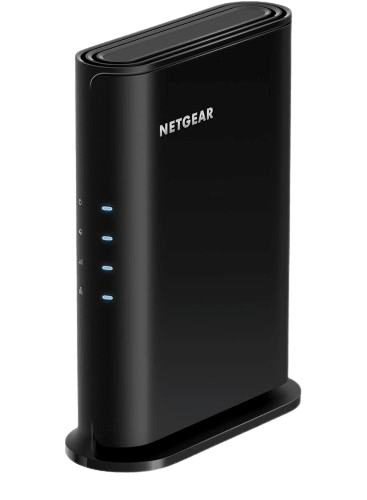
The NETGEAR Nighthawk R6700AX is a straightforward dual-band Wi-Fi 6 router designed for apartments and smaller households. It advertises wireless speeds of up to 1.8 Gbps across the 2.4 GHz and 5 GHz frequency bands. Its manufacturer-rated coverage reaches up to 1,500 square feet, with support for as many as 20 connected devices.
The R6700AX focuses on essential home networking. It includes four Gigabit Ethernet ports and a separate Gigabit WAN connection, allowing users to connect computers, consoles, and streaming equipment through Ethernet. WPA3 security, automatic firmware updates, and guest network functionality make it a practical option for everyday use.
Key Specifications
| Feature | Details |
| Wi-Fi Standard | Wi-Fi 6 (802.11ax) |
| Wireless Speed | Up to 1.8 Gbps |
| Frequency Bands | Dual-band |
| Ethernet Connectivity | 4 × Gigabit LAN, 1 × Gigabit WAN |
| Antennas | 2 |
| Security | WPA2, WPA3 |
| Coverage | Up to 1,500 sq. ft. |
| Device Capacity | Up to 20 devices |
Core Features
Dual-Band Wi-Fi 6
The R6700AX delivers advertised wireless speeds of up to 1.8 Gbps across 2.4 GHz and 5 GHz bands. Wi-Fi 6 helps improve network efficiency, particularly when multiple compatible devices share the same connection.
Coverage for Smaller Properties
NETGEAR rates this router for coverage of up to 1,500 square feet. This makes it suitable for apartments, smaller houses, and compact home offices. However, its performance may decrease when signals pass through several walls or floors.
Four Gigabit LAN Ports
Four Gigabit Ethernet ports support wired connections for gaming consoles, desktop computers, smart TVs, and other equipment. A separate Gigabit WAN port connects the router to an existing modem or gateway.
Why You’ll Like It
- Affordable Wi-Fi 6: It provides budget-friendly modern wireless connectivity.
- Simple networking: Its dual-band configuration suits everyday use.
- Wired connections: Four Gigabit Ethernet ports support connected devices.
- WPA3 security: It adds modern wireless protection.
- Compact coverage: Its coverage rating suits apartments and smaller homes.
Keep in Mind
- Limited coverage: It covers less area than mesh systems.
- Device capacity: It supports fewer devices than premium Nighthawk models.
- No Wi-Fi 7: It does not offer Wi-Fi 7 or a multi-gigabit Ethernet port.
Best For
The R6700AX is best for apartment residents, small households, students, and people working from home. It provides the essential networking features needed for streaming, browsing, video calls, and everyday online activities.
Price: ≈ $58.17
9. NETGEAR WiFi Router AC1200: Best Basic NETGEAR Router
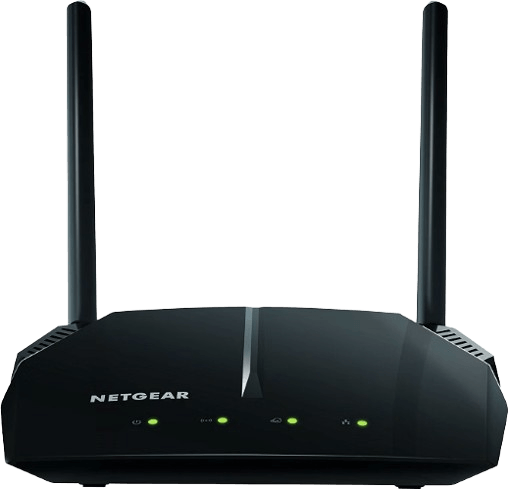
The NETGEAR WiFi Router AC1200 is a basic dual-band Wi-Fi 5 router designed for everyday internet activities. It offers combined advertised wireless speeds of up to 1.2 Gbps, with up to 300 Mbps on the 2.4 GHz band and 900 Mbps on the 5 GHz band. Its coverage reaches up to 1,200 square feet, making it suitable for smaller homes and apartments.
The R6120 provides essential connectivity features for browsing, video streaming, and everyday devices. It includes four Fast Ethernet ports and a USB 2.0 port for compatible storage or printer sharing. Its guest Wi-Fi, firewall, and WPA2 security features also provide basic network management.
Key Specifications
| Feature | Details |
| Wi-Fi Standard | Wi-Fi 5 (802.11ac) |
| Wireless Speed | Up to 1.2 Gbps |
| Frequency Bands | Dual-band |
| Ethernet Connectivity | 4 × 10/100 Fast Ethernet |
| Antennas | 3 |
| Security | WPA-PSK, WPA2-PSK |
| Coverage | Up to 1,200 sq. ft. |
| Device Capacity | Up to 20 devices |
Core Features
Dual-Band AC1200 Wireless Technology
The R6120 uses Wi-Fi 5 technology to deliver combined advertised speeds of up to 1.2 Gbps. Its 2.4 GHz band supports a wider range of everyday devices, while the 5 GHz band provides higher potential throughput over shorter distances. For smaller spaces, the best NETGEAR routers may be simpler dual-band models rather than premium Wi-Fi 7 systems.
Coverage for Small Homes
Its manufacturer-rated coverage reaches up to 1,200 square feet. Therefore, it can suit compact properties where basic wireless connectivity is more important than advanced network capacity.
Four Fast Ethernet Ports
The router includes four 10/100 Mbps Ethernet ports for wired connections. These can connect computers, gaming consoles, and streaming equipment. However, they are slower than Gigabit Ethernet ports, which limits its usefulness for high-speed wired internet plans.
Why You’ll Like It
- Entry-level price: It suits basic networking requirements.
- Dual-band Wi-Fi: Wi-Fi 5 supports everyday wireless connections.
- USB connectivity: USB 2.0 supports compatible peripherals.
- Basic management: Guest Wi-Fi and firewall features provide network controls.
- Compact design: Its size suits smaller properties.
Keep in Mind
- Older Wi-Fi standard: It does not support Wi-Fi 6 or Wi-Fi 7.
- Slow Ethernet: Its Fast Ethernet ports are limited to 100 Mbps.
- No WPA3: It does not support WPA3 security.
Best For
The R6120 is best for small households with modest internet requirements. It can handle basic browsing, email, standard-definition streaming, and everyday wireless connections. However, households with gigabit internet plans or demanding gaming requirements should consider a newer model.
Price: ≈ $56.69
10. NETGEAR Orbi Whole Home RBS750: Best Wi-Fi Extender NETGEAR Router

The NETGEAR Orbi Whole Home RBS750 is a Wi-Fi 6 mesh satellite designed to extend the coverage of a compatible Orbi networking system. It is not a standalone router. Instead, it works with the Orbi RBK752 system to expand the existing wireless network and help eliminate dead zones.
Each RBS750 satellite is rated to add up to 2,500 square feet of coverage. It supports the AX4200 Wi-Fi 6 system class, with advertised combined wireless speeds of up to 4.2 Gbps. Its tri-band architecture helps maintain communication between compatible mesh devices.
Key Specifications
| Feature | Details |
| Wi-Fi Standard | Wi-Fi 6 (802.11ax) |
| Wireless Speed | AX4200 system class, up to 4.2 Gbps |
| Frequency Bands | Tri-band |
| Ethernet Connectivity | 2 Ethernet ports |
| Antennas | 4 internal |
| Security | Compatible Orbi system security |
| Coverage | Up to 2,500 sq. ft. additional coverage |
| Compatibility | Orbi RBK752 system |
Core Features
Wi-Fi 6 Mesh Expansion
The RBS750 is designed to extend an existing compatible Orbi Wi-Fi 6 network. Instead of creating a separate network name, it helps provide a continuous wireless connection across the property. Connected devices can move between supported mesh units without manually switching networks.
Additional Coverage of Up to 2,500 Square Feet
Each satellite adds manufacturer-rated coverage of up to 2,500 square feet. This is useful for homes where the main router cannot adequately reach distant bedrooms, basements, or other areas.
Tri-Band AX4200 Technology
The RBS750 belongs to the AX4200 tri-band Orbi system. Its additional wireless band helps the mesh network manage communication between connected units and client devices.
Why You’ll Like It
- Extra coverage: Each satellite adds up to 2,500 square feet of coverage.
- Wi-Fi 6 mesh: Tri-band technology supports compatible Orbi networking.
- System compatibility: It works with the Orbi RBK752 system.
- Network controls: Beamforming and QoS provide additional management features.
- Continuous connection: It helps maintain one mesh network throughout the property.
Keep in Mind
- Satellite only: It is not a standalone router.
- Compatibility check: Its compatibility must be checked before purchasing.
- System speed rating: Its AX4200 rating describes the compatible system class, not an independent internet speed.
Best For
The RBS750 is best for existing Orbi RBK752 owners who need additional coverage. It is particularly useful for extending Wi-Fi to distant rooms, upper floors, and other areas where the primary router’s signal becomes weak. When wired connections matter, the best NETGEAR routers should be judged by their Ethernet ports as well as wireless speed.
Price: ≈ $129.00
NETGEAR Offers Two Main Router Lineups: Nighthawk and Orbi

NETGEAR organizes many of its home networking products under two major families: Nighthawk and Orbi. Both provide wireless connectivity, but they serve different networking needs. Nighthawk focuses primarily on standalone routers, while Orbi specializes in mesh networking systems.
Nighthawk
Nighthawk routers are designed for users who want a powerful central networking device. They include Wi-Fi 5, Wi-Fi 6, and Wi-Fi 7 options. For example, the Nighthawk RS700S offers up to 19 Gbps of advertised wireless speed, while the RS500 provides up to 12 Gbps. More affordable models, such as the R6700AX, provide Wi-Fi 6 connectivity for everyday internet activities.
Key characteristics of Nighthawk routers:
- Standalone router designs.
- Options for gaming and high-speed networking.
- Multiple Ethernet connectivity options.
- Dual-band and tri-band configurations.
- Nighthawk app-based network management.
Orbi
Orbi systems use multiple networking units to distribute wireless connectivity throughout a property. A typical package includes one main router and one or more satellite units. The satellites communicate with the main router to extend the network into areas that may otherwise experience weak signals.
For instance, the Orbi 970 provides coverage of up to 10,000 square feet, while the Orbi 770 covers up to 8,000 square feet. The Orbi 370 offers a more affordable Wi-Fi 7 mesh option.
Key characteristics of Orbi systems:
- Router and satellite configurations.
- Coverage expansion for large properties.
- Compatible mesh satellite options.
- Dual-band, tri-band, and quad-band models.
- Centralized network management through the Orbi app.
Choose Nighthawk if a standalone router can cover your home and you want strong wireless performance or multi-gigabit Ethernet connectivity. Orbi is more suitable when your home has multiple floors, distant rooms, or persistent Wi-Fi dead zones.
Wi-Fi 7 vs. Wi-Fi 6: Which Gives Better Performance?
Wi-Fi 7 and Wi-Fi 6 are wireless networking generations designed to improve speed, capacity, and efficiency. Wi-Fi 7 introduces several technical improvements, including wider channels, Multi-Link Operation, and 4K QAM. However, Wi-Fi 6 remains capable of handling most everyday household networking needs.
| Feature | Wi-Fi 7 | Wi-Fi 6 |
| Standard | IEEE 802.11be | IEEE 802.11ax |
| Maximum theoretical speed | Up to 46 Gbps | Up to 9.6 Gbps |
| Maximum channel width | 320 MHz | 160 MHz |
| Frequency bands | 2.4, 5, and 6 GHz, depending on device | 2.4 and 5 GHz; 6 GHz with Wi-Fi 6E |
| Multi-Link Operation | Supported | Not supported |
| 4K QAM | Supported | Not supported |
| MU-MIMO | Supported | Supported |
| OFDMA | Supported | Supported |
| Backward compatibility | Supports compatible older Wi-Fi devices | Supports compatible older Wi-Fi devices |
Wi-Fi 7: Higher Speed and Lower Latency Potential
Wi-Fi 7 introduces Multi-Link Operation (MLO), which allows compatible devices to use multiple frequency links simultaneously. This can improve connection reliability, reduce latency, and increase throughput under suitable conditions.
It also supports channel widths of up to 320 MHz, compared with 160 MHz in Wi-Fi 6. Wider channels provide more bandwidth for compatible devices. Additionally, 4K QAM modulation can transmit more data under favorable signal conditions. NETGEAR models such as the Orbi 970, Nighthawk RS700S, and RS500 use Wi-Fi 7 technology.
Wi-Fi 6: Reliable Performance for Everyday Use
Wi-Fi 6 remains a practical choice for most households. It uses OFDMA and MU-MIMO to improve network efficiency when multiple devices connect simultaneously. It supports channel widths of up to 160 MHz and theoretical combined data rates of up to 9.6 Gbps.
Although its maximum theoretical speed is lower than Wi-Fi 7, it can provide sufficient performance for everyday streaming, browsing, gaming, and video conferencing. NETGEAR models such as the Nighthawk R6700AX, RAX41, and CAX30 use Wi-Fi 6 technology. The best NETGEAR routers also vary in their security tools, device controls, and network-management options.
Do NETGEAR Routers Offer Better Performance Than TP Link, ASUS and More?
NETGEAR competes with several established networking brands, including TP-Link, ASUS, eero, and GL.iNet. Each manufacturer offers different combinations of wireless performance, coverage, security, and network management. However, no single brand automatically provides the best performance in every situation.
NETGEAR vs. TP-Link
TP-Link competes directly with NETGEAR through its Archer router and Deco mesh product families. Both brands offer Wi-Fi 6 and Wi-Fi 7 options, as well as equipment for different budgets.
NETGEAR’s Nighthawk models emphasize standalone networking performance, while Orbi provides mesh coverage. TP-Link offers a similar division through Archer and Deco. Therefore, the comparison often comes down to the specifications, features, and price of individual models rather than the brand name alone.
NETGEAR vs. ASUS
ASUS offers routers for general home networking, advanced configuration, and gaming. Its ROG product family includes models with gaming-focused controls and networking features.
NETGEAR also provides gaming-capable Nighthawk routers and high-performance Wi-Fi 7 options. However, the two brands differ in software interfaces, feature availability, and product pricing. ASUS may appeal to users who want extensive configuration options, while NETGEAR offers the Nighthawk and Orbi ecosystems.
NETGEAR vs. eero
eero focuses heavily on mesh networking and simplified home Wi-Fi management. Its products are designed to make wireless installation and network management accessible to everyday households.
NETGEAR’s Orbi systems offer a similar whole-home networking approach. However, NETGEAR also provides Nighthawk standalone routers, giving buyers more options beyond mesh networking. eero may suit households that prioritize straightforward mesh setup, while NETGEAR offers more variety across standalone and mesh categories.
NETGEAR vs. GL.iNet
GL.iNet has a different focus from NETGEAR. Its product lineup includes travel routers, portable networking equipment, and routers with advanced VPN functionality.
NETGEAR concentrates more heavily on traditional home networking, high-speed wireless routers, and mesh systems. Therefore, the two brands often serve different audiences. GL.iNet is particularly appealing for users who need portable connectivity, VPN-focused networking, or greater control over network configurations.
| Comparison | NETGEAR | TP-Link | ASUS | eero | GL.iNet |
| Main product families | Nighthawk, Orbi | Archer, Deco | ASUS routers, ROG | eero mesh systems | Travel routers and home routers |
| Wi-Fi options | Wi-Fi 5, 6, 7 | Wi-Fi 5, 6, 7 | Model-dependent | Model-dependent | Model-dependent |
| Mesh networking | Orbi | Deco | AiMesh-compatible models | Core product category | Model-dependent |
| Gaming options | Nighthawk | Archer gaming models | ROG and gaming routers | Limited focus | Model-dependent |
| VPN features | Model-dependent | Model-dependent | Model-dependent | Model-dependent | Strong VPN-focused product selection |
| Management | Nighthawk and Orbi apps | TP-Link Tether and Deco apps | ASUS Router app and web interface | eero app | Model-dependent |
| Main strengths | High-performance routers and mesh options | Broad product selection and mesh options | Advanced configuration and gaming features | Simplified mesh networking | Portable and VPN-focused networking |
What Features Should You Check Before Buying a NETGEAR Router?

Choosing a router involves more than comparing advertised speeds. Your internet plan, home size, connected devices, security requirements, and everyday activities all affect which model makes sense. Consider these five factors before buying.
Maximum Network Connection Speed
Check the router’s advertised wireless speed and Ethernet ports. For example, the Orbi 970 advertises up to 27 Gbps, while the Nighthawk RS700S offers up to 19 Gbps. However, these are combined theoretical wireless rates, not the speed a single device will receive.
Your internet plan also matters. A 10 Gbps router cannot deliver a 10 Gbps internet connection if your ISP plan supports only 1 Gbps. Check the WAN and LAN port speeds, internet plan compatibility, and multi-gigabit support before purchasing.
Frequency Bands and Wi-Fi Standard
Dual-band routers use 2.4 GHz and 5 GHz, while tri-band and quad-band models provide additional wireless capacity.
| Band Configuration | Frequency | Best Use |
| Single-band | 2.4 GHz | Basic networking |
| Dual-band | 2.4 GHz + 5 GHz | Everyday home use |
| Tri-band | Three wireless bands | Busy households |
| Quad-band | Four wireless bands | High-capacity mesh networks |
The 2.4 GHz band offers better reach, while 5 GHz provides higher potential speeds. The 6 GHz band adds spectrum for compatible Wi-Fi 6E and Wi-Fi 7 devices. Also, consider Wi-Fi 7 features such as Multi-Link Operation (MLO) and wider channels.
Coverage and Mesh Compatibility
Coverage depends on your home layout, walls, floors, interference, and satellite placement. For example, the Nighthawk R6700AX is rated for up to 1,500 square feet, while the three-piece Orbi 770 system covers up to 8,000 square feet.
These are manufacturer estimates, not guaranteed results. Check the coverage rating, included satellites, and mesh compatibility. A standalone Nighthawk router may suit a smaller home, while an Orbi mesh system can help reduce dead zones in larger or multi-story properties.
Security and Network Management
Look for WPA3, automatic firmware updates, guest networks, and built-in security features. Several newer NETGEAR models support WPA3 and Advanced Router Protection.
NETGEAR Armor offers additional online threat protection, but continued access requires a subscription after the introductory trial. Also, check parental controls, app-based management, and device access settings before buying.
Wired Connectivity and Connected Devices
Ethernet ports are important for gaming PCs, smart TVs, desktop computers, and network storage devices.
- Gigabit Ethernet: Up to 1 Gbps
- 2.5 Gigabit Ethernet: Up to 2.5 Gbps
- 10 Gigabit Ethernet: Up to 10 Gbps
Consider the number of connected devices and features such as MU-MIMO, OFDMA, beamforming, QoS, MLO, and USB connectivity. For example, the Orbi 970 supports up to 200 devices, while the Orbi 370 supports up to 70. These figures do not guarantee maximum speeds for every device.
Finally, check ISP compatibility. Standalone routers generally connect to an existing modem or gateway, while modem-router combinations such as the CAX30 require compatible cable internet service.
Our Top Picks
Say Goodbye to Wi-Fi Dead Zones. Upgrade to NETGEAR!
| Best Overall | Best High-Speed | Best for Large Homes | Best for Gaming |
| NETGEAR Orbi 970 Series | NETGEAR Nighthawk RS700S | NETGEAR Orbi 770 Series | NETGEAR Nighthawk RS500 |
| | | |
| Quad-band Wi-Fi 7, up to 10,000 sq. ft. coverage, support for 200 devices | Tri-band Wi-Fi 7, up to 19 Gbps, 10 Gigabit connectivity | Three-piece Wi-Fi 7 mesh system, up to 8,000 sq. ft. coverage | Tri-band Wi-Fi 7, up to 12 Gbps, support for 120 devices |
| $1,699.99 | $539.99 | $569.98 | $369.99 |
Final Verdict
Choosing the right NETGEAR router depends on your household size, internet speed, connected devices, and budget. While premium Wi-Fi 7 systems offer advanced networking capabilities, more affordable Wi-Fi 6 models can still deliver dependable performance for everyday activities.
The NETGEAR Orbi 970 Series is our leading overall choice because of its quad-band Wi-Fi 7 technology, 10,000-square-foot coverage, dedicated backhaul, and support for up to 200 devices. However, its premium price makes it excessive for smaller households.
For standalone performance, the NETGEAR Nighthawk RS700S offers an excellent combination of tri-band Wi-Fi 7, 19 Gbps advertised speed, and 10 Gigabit connectivity. Meanwhile, the Orbi 770 is a practical alternative for large homes, and the RS500 provides strong networking capabilities for gaming and multitasking.
If affordability matters more, the Nighthawk R6700AX and RAX41 provide useful Wi-Fi 6 features without the cost of premium systems.
Ultimately, select a router that matches your internet plan and property size. Paying extra for advanced specifications only makes sense when your connected devices and networking requirements can take advantage of them.
FAQs
Which NETGEAR router is the best overall in 2026?
The NETGEAR Orbi 970 Series is our best overall selection because it combines quad-band Wi-Fi 7, dedicated backhaul, and extensive mesh coverage. Its three-piece configuration covers up to 10,000 square feet and supports up to 200 connected devices. Its advertised wireless speed reaches 27 Gbps, while its 10 Gigabit Ethernet connectivity supports compatible multi-gigabit internet equipment.
However, it is an expensive system and may be unnecessary for smaller households. If a standalone router is preferred, the Nighthawk RS700S is a strong alternative with tri-band Wi-Fi 7, up to 19 Gbps advertised wireless speed, and coverage of up to 3,500 square feet. Ultimately, the best NETGEAR routers are the models that match the household’s coverage, speed, and connectivity requirements.
Are NETGEAR Wi-Fi 7 routers worth buying?
Yes, NETGEAR Wi-Fi 7 routers are worth considering if you have compatible devices, a fast internet subscription, or demanding networking requirements. Wi-Fi 7 introduces Multi-Link Operation, 320 MHz channel support, and 4K QAM. These technologies can improve throughput, connection efficiency, and latency under suitable conditions.
Models such as the Orbi 970, Orbi 770, Nighthawk RS700S, and RS500 offer different combinations of Wi-Fi 7 performance and coverage. Nevertheless, upgrading is not essential for everyone. If your current devices use Wi-Fi 5 or Wi-Fi 6 and your internet plan is relatively modest, a newer router may not produce a noticeable improvement in everyday browsing or streaming.
Which NETGEAR router is best for gaming?
The NETGEAR Nighthawk RS500 is a strong choice for gaming because it combines tri-band Wi-Fi 7 with advertised wireless speeds of up to 12 Gbps. It also supports MU-MIMO and OFDMA, which help manage multiple connected devices. Its 2.5 Gigabit Ethernet connection provides an additional option for compatible gaming PCs and consoles.
For the best gaming connection, using Ethernet is generally preferable when practical. A wired connection avoids many of the interference and signal fluctuations associated with wireless networking. The RS700S is another option for users who need higher advertised wireless capacity and a 10 Gigabit Ethernet port.
Are NETGEAR routers better than TP-Link, ASUS, or eero?
No brand is automatically better for every household. NETGEAR offers Nighthawk standalone routers and Orbi mesh systems, while TP-Link provides Archer routers and Deco mesh products. ASUS offers gaming-focused and advanced configuration options, and eero focuses heavily on simplified mesh networking.
The right choice depends on the specific model, wireless standard, coverage, Ethernet ports, security features, and price. Compare individual products against your internet plan and home layout rather than relying only on brand reputation.
What is the difference between a NETGEAR router and a modem-router combo?
A traditional NETGEAR router distributes an existing internet connection to wireless and wired devices. It usually connects to a separate modem or an ISP-provided gateway through an Ethernet cable.
A modem-router combo combines both functions in one device. The NETGEAR Nighthawk CAX30 is an example because it includes a DOCSIS 3.1 cable modem and a Wi-Fi 6 router. This reduces the need for separate modem and router equipment.
However, modem-router combinations are more dependent on internet provider compatibility. Before purchasing the CAX30, check whether your cable ISP supports it and whether your subscribed plan is compatible. A standalone router is generally more flexible when using a separate modem or switching between supported internet connection types.
Can I use a NETGEAR router with any internet provider?
Most standalone NETGEAR routers can work with different internet providers when connected to a compatible modem or gateway through Ethernet. However, compatibility depends on your ISP’s equipment, connection type, and configuration requirements.
The CAX30 is different because it includes a cable modem. It is designed for compatible cable providers, including Xfinity, Spectrum, and Cox, subject to their supported plans. It is not compatible with fiber or DSL modem connections. Always verify provider approval before purchasing a modem-router combo.
You May Also Like