

What if your router could eliminate lag, handle dozens of connected devices, and keep every corner of your home online? The right choice depends on more than advertised speed. Coverage, wireless bands, Ethernet ports, security tools, and gaming features all play a role.
In these best ASUS routers review for 2026, we examine 10 ASUS models across Wi-Fi 6, Wi-Fi 7, and one model marketed as Wi-Fi 8. From flagship gaming hardware to budget-friendly dual-band options, each router brings a different mix of performance, connectivity, and features. Whether you’re upgrading a crowded smart home, improving whole-home coverage, or building a faster gaming setup, this roundup highlights what each model offers and which networking needs it suits best.
| Best Overall | Best for VPN | Best for Large Homes | Best for Budget |
| ASUS ROG Rapture GT BE98 Pro | ASUS RT BE9700 | ASUS ZenWiFi BQ16 Pro | ASUS RT AX1800S |
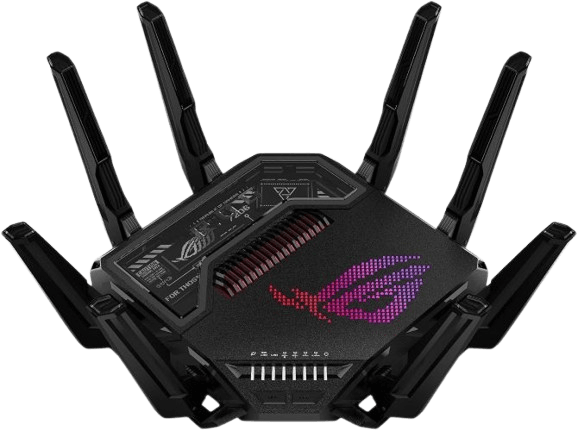 |  |  |  |
| Quad-band Wi-Fi 7; Up to 30Gbps; 2 × 10G + 4 × 2.5G Ethernet | Tri-band Wi-Fi 7; Up to 9.7Gbps; Advanced VPN support | Quad-band Wi-Fi 7; Two-unit mesh system; Up to 8,000 sq. ft. coverage | Dual-band Wi-Fi 6; Up to 1.8Gbps; 1 WAN + 4 Gigabit LAN ports |
| $684.99 | $249.99 | $999.99 | $61.99 |
You May Also Like:
- 8 Best Wi-Fi Routers in 2026, Reviewed for Faster Speed
- 10 Best ASUS Laptops in 2026, Tested and Reviewed
10 Best ASUS Routers of 2026 for Every Budget, Speed & Range
ASUS offers several router families, including ROG gaming routers, ZenWiFi mesh systems, and RT-series models for everyday networking. The best ASUS routers of 2026 vary in Wi-Fi 6, Wi-Fi 7, and advertised Wi-Fi 8 support, multi-gigabit connectivity, gaming features, and whole-home coverage.
The following comparison highlights 10 ASUS routers by model, key specifications, best use, and price, making it easier to find the right ASUS Wi-Fi router for gaming, large homes, or everyday internet use.
| Model | Key Specifications | Best For | Price |
| ASUS ROG Rapture GT BE98 Pro | Quad-band Wi-Fi 7; up to 30Gbps;2 × 10G + 4 × 2.5G Ethernet | Best Overall | $684.99 |
| ASUS RT BE9700 | Tri-band Wi-Fi 7; up to 9.7Gbps;320MHz channel support | Best VPN | $249.99 |
| ASUS GT BN98 Pro | Quad-band Wi-Fi 8; up to 30Gbps; 2 × 10G + 4 × 2.5G Ethernet | Best Wi-Fi 8 | $899.99 |
| ASUS RT BE88U | Dual-band Wi-Fi 7; up to 7.2Gbps; 10G and 2.5G Ethernet ports | Best for Multi-Gigabit Wired | $339.00 |
| ASUS ZenWiFi BQ16 Pro | Quad-band Wi-Fi 7; up to 30Gbps; two-unit mesh system | Best for Mesh Coverage | $999.99 |
| ASUS ROG Rapture GT AX11000 Pro | Tri-band Wi-Fi 6; six external antennas; gaming-focused features | Best for Gaming | $209.00 |
| ASUS ROG Strix GS BE12000 | Tri-band Wi-Fi 7; up to 12Gbps; 8 × 2.5G Ethernet ports | Best for Tri-band | $314.99 |
| ASUS ROG Strix GS BE18000 | Tri-band;up to 11.259Gbps; 2.5G Ethernet | Best for High Speed | $299.99 |
| ASUS RT AX3000S | Dual-band Wi-Fi 6; up to 3Gbps; AiMesh support | Best for Wi-Fi 6 | $89.99 |
| ASUS RT AX1800S | Dual-band Wi-Fi 6; up to 1.8Gbps; 1 WAN + 4 Gigabit LAN ports | Best Budget | $61.99 |
1. ASUS ROG Rapture GT BE98 Pro: Best Overall ASUS Router
The ASUS ROG Rapture GT BE98 Pro combines quad-band Wi-Fi 7 with powerful wired networking and dedicated gaming features. Its advertised combined wireless throughput reaches 30Gbps, supported by 320MHz channels in the 6GHz band and 4096-QAM modulation. Moreover, Multi-Link Operation (MLO) allows compatible devices to use multiple frequency bands simultaneously. Its eight external antennas are designed to improve signal distribution, while dual 10Gbps and four 2.5Gbps Ethernet ports provide extensive wired connectivity. With Triple-Level Game Acceleration, AiMesh compatibility, and advanced network management, this router is designed for demanding gaming setups and households with numerous connected devices.
For households choosing among the best ASUS routers, the GT-BE98 Pro stands out when both high wireless capacity and fast wired connections are priorities.
Key Specifications
| Specification | Details |
| Wi-Fi Standard | Wi-Fi 7 (802.11be) |
| Frequency Bands | Quad-band |
| Maximum Combined Speed | Up to 30Gbps |
| Channel Width | Up to 320MHz |
| Modulation | 4096-QAM |
| Mesh Support | ASUS AiMesh |
| Ethernet Ports | 2 × 10G, 4 × 2.5G |
| Antennas | 8 external |
| Dimensions | 13.7 × 8.6 × 13.7 inches |
| Weight | 4.4 pounds |
Core Features
Quad-Band Wi-Fi 7
The GT-BE98 Pro uses four wireless bands to provide additional network capacity. Its 2.4GHz, 5GHz, and dual 6GHz configurations support different connectivity requirements. This arrangement is useful when several devices simultaneously handle gaming, streaming, downloads, and other bandwidth-intensive activities. However, compatible client devices are necessary to benefit from the newest Wi-Fi 7 features.
Multi-Link Operation (MLO)
MLO allows compatible devices to establish connections across multiple frequency bands or links. Instead of relying on only one wireless connection, supported devices can use multiple links to improve throughput, reliability, or responsiveness. The actual benefit depends on client compatibility and network conditions.
Triple-Level Game Acceleration
ASUS integrates gaming traffic optimization to prioritize network activity associated with gaming. The feature works across different stages of the connection, helping gaming traffic receive priority when other household devices compete for bandwidth. It cannot eliminate latency caused by distant game servers or ISP routing, but it offers additional network management control.
Multi-Gigabit Ethernet
The router includes two 10Gbps ports and four 2.5Gbps ports. These connections are useful for high-speed NAS systems, gaming PCs, workstations, and compatible internet equipment. Consequently, users can build a fast wired network without depending entirely on wireless connections.
Eight External Antennas
Its eight-antenna arrangement is designed to distribute wireless signals throughout the home. The external design also provides flexibility in antenna positioning. However, actual coverage depends on router placement, walls, interference, and the surrounding environment.
Why You’ll Like It
High Throughput: Its advertised 30Gbps combined wireless capacity provides substantial theoretical bandwidth for demanding networks.
Fast Ethernet: Dual 10G and four 2.5G ports support several multi-gigabit wired devices.
Gaming Optimization: Triple-Level Game Acceleration provides additional control over gaming traffic.
Mesh Expansion: AiMesh compatibility allows users to expand coverage with compatible ASUS routers.
What You Should Consider
Large Design: Its eight external antennas and sizeable body require considerable desk or shelf space.
Premium Price: Its $684.99 price may be excessive for ordinary browsing and streaming.
Device Compatibility: Older wireless devices cannot take full advantage of its Wi-Fi 7 features.
Best For
Gaming enthusiasts, content creators, and households with multiple high-bandwidth devices. It is particularly suitable for setups that need both advanced wireless networking and multi-gigabit wired connections.
Price: $684.99
2. ASUS RT BE9700: Best VPN ASUS Router
The ASUS RT BE9700 brings Wi-Fi 7 connectivity to a more accessible price range than flagship ROG models. Its tri-band configuration covers 2.4GHz, 5GHz, and 6GHz frequencies, with advertised combined wireless speeds of up to 9.7Gbps. In addition, 320MHz channels and 4096-QAM help increase theoretical throughput for compatible devices. Its VPN functionality is another major advantage, offering options such as site-to-site VPN support and ASUS Instant Guard. The router also includes AiProtection, parental controls, and AiMesh compatibility, making it an appealing option for households that want modern wireless connectivity alongside additional network security and management features.
Among the best ASUS routers for security-focused homes, the RT-BE9700 is notable for combining Wi-Fi 7 with built-in VPN and protection tools.
Key Specifications
| Specification | Details |
|---|---|
| Wi-Fi Standard | Wi-Fi 7 (802.11be) |
| Frequency Bands | Tri-band |
| Maximum Combined Speed | Up to 9.7Gbps |
| Channel Width | Up to 320MHz |
| 2.4GHz Speed | Up to 1,032Mbps |
| Mesh Support | ASUS AiMesh |
| Ethernet Ports | 6 total |
| Antennas | 4 |
| Dimensions | 11.3 × 4 × 9.7 inches |
| Weight | 1.7 pounds |
Core Features
Tri-Band Wi-Fi 7
The router operates on 2.4GHz, 5GHz, and 6GHz bands, with individual theoretical speeds of up to 1,032Mbps, 2,882Mbps, and 5,764Mbps, respectively. This configuration gives compatible devices more flexibility when connecting to the network. The 6GHz band also provides access to additional wireless spectrum, although its shorter effective range through obstacles should be considered when choosing router placement.
Advanced VPN Support
VPN functionality is one of this router’s main attractions. It supports advanced VPN configurations, including site-to-site VPN, while Instant Guard provides a convenient way to establish secure remote access to a home network. This can be useful for remote workers and users who frequently connect through public Wi-Fi networks.
Multi-Link Operation
MLO allows compatible Wi-Fi 7 devices to use multiple wireless links. Depending on the implementation, this can improve connection reliability and network responsiveness. It is especially relevant in households where several devices compete for wireless bandwidth.
AiProtection
ASUS includes network security features designed to help identify and block malicious activity. The router also provides parental controls and network management tools. These features offer additional control over connected devices without requiring a separate security subscription for the included protection features.
AiMesh Compatibility
The RT-BE9700 can work with compatible ASUS routers to expand wireless coverage. This allows users to build a broader network as their coverage requirements change instead of replacing the original router.
Why You’ll Like It
VPN Options: Advanced VPN support and Instant Guard provide useful remote-access capabilities.
Modern Wi-Fi: Tri-band Wi-Fi 7 supports newer wireless technologies.
Network Protection: AiProtection and parental controls add useful security management features.
Mesh Expansion: AiMesh support makes future coverage upgrades easier.
What You Should Consider
Limited Antennas: Four antennas provide a simpler configuration than larger gaming models.
Client Requirements: Full Wi-Fi 7 benefits require compatible devices.
Best For
Remote workers, privacy-conscious households, and users want Wi-Fi 7 with integrated VPN functionality. It is particularly appealing when network security and expandable coverage matter as much as wireless speed.
Price:$249.99
3. ASUS GT BN98 Pro: Best Wi-Fi 8 ASUS Routers

The ASUS GT BN98 Pro is marketed as a quad-band Wi-Fi 8 gaming router with advertised combined throughput of up to 30Gbps. Its listed features include 320MHz channels, 4096-QAM, adaptive Quality of Experience (QoE), and advanced network monitoring. The router also includes two 10Gbps and four 2.5Gbps Ethernet ports for multi-gigabit wired networking. Gaming-oriented tools such as GTNet and Wi-Fi Insight add network monitoring and connection management capabilities. However, its advertised Wi-Fi 8 standard and commercial specifications require independent verification before purchase.
Its unusual positioning means it should not be treated as a proven choice alongside established best ASUS routers until its standard and retail specifications are confirmed.
Key Specifications
| Specification | Details |
| Wi-Fi Standard | Wi-Fi 8 (802.11bn) |
| Frequency Bands | Quad-band |
| Maximum Combined Speed | Up to 30Gbps |
| Channel Width | Up to 320MHz |
| Modulation | 4096-QAM |
| Mesh Support | Mesh compatibility |
| Ethernet Ports | 2 × 10G, 4 × 2.5G |
| Gaming Features | Adaptive QoE, GTNet |
| Network Monitoring | Wi-Fi Insight |
| Dimensions | 13.78 × 8.66 × 13.78 inches |
Core Features
Advertised Wi-Fi 8
The GT-BN98 Pro is marketed around next-generation wireless connectivity. Wi-Fi 8 is associated with IEEE 802.11bn development, which focuses on improving wireless reliability and performance. The product information also advertises a 30Gbps combined throughput rating. However, the actual standard, certification, and supported features should be confirmed through official documentation rather than assumed from the marketing description.
Adaptive Quality of Experience
Adaptive QoE is designed to allocate network resources according to changing network conditions and application requirements. This can help manage competing activities such as online gaming, video conferencing, large downloads, and streaming. Its practical effectiveness depends on the router’s implementation and the type of network traffic.
Wi-Fi Insight
This feature monitors wireless network conditions and helps identify possible interference. It can be useful when troubleshooting connection issues or evaluating wireless performance in a crowded networking environment.
GTNet
GTNet is described as a network path analysis service that helps identify reliable routes to game servers. It is intended to support gaming connections by examining network conditions. Actual gaming latency will still depend on the ISP, server location, and external routing.
Multi-Gigabit Ethernet
The router includes two 10Gbps ports and four 2.5Gbps ports. These connections provide flexibility for gaming computers, NAS equipment, and high-speed wired network devices. It also supports Guest Network Pro, with up to five SSIDs listed for separating different network environments.
Why You’ll Like It
Multi-Gigabit Ports: Two 10G and four 2.5G ports offer extensive wired connectivity.
Gaming Tools: Adaptive QoE and GTNet provide additional network management options.
Network Monitoring: Wi-Fi Insight helps identify potential wireless interference.
Network Separation: Multiple SSIDs allow different categories of devices to use separate network environments.
What You Should Consider
Standard Verification: Its Wi-Fi 8 capabilities need independent certification and specification checks.
Limited Evidence: Independent performance benchmarks are not included in the supplied information.
Best For
Early adopters and gaming enthusiasts interested in advanced networking features. However, the advertised Wi-Fi 8 standard, product availability, and certification should be confirmed before spending money.
Price: $899.99
4. ASUS RT BE88U: Best for Multi-Gigabit Wired ASUS Router

The ASUS RT BE88U combines Wi-Fi 7 connectivity with extensive wired networking options. Its advertised combined wireless throughput reaches 7.2Gbps, while 320MHz channels and 4096-QAM support higher theoretical speeds for compatible devices. Its main attraction is the Ethernet configuration, which includes a 10G SFP+ port, a 10G WAN/LAN port, four 2.5G ports, and four Gigabit ports. A quad-core 2.6GHz processor handles networking tasks, while AiMesh, AiProtection Pro, and Guest Network Pro add useful management options. Its dual-band configuration lacks a dedicated 6GHz band, but the extensive wired connectivity makes it appealing for home offices and NAS users.
For users comparing the best ASUS routers for a wired home office, the RT-BE88U offers an especially broad selection of multi-gigabit connections.
Key Specifications
| Specification | Details |
| Wi-Fi Standard | Wi-Fi 7 (802.11be) |
| Frequency Bands | Dual-band |
| Maximum Combined Speed | Up to 7.2Gbps |
| Channel Width | Up to 320MHz |
| Processor | Quad-core 2.6GHz |
| Mesh Support | ASUS AiMesh |
| Ethernet Ports | 1 × 10G SFP+, 1 × 10G WAN/LAN, 4 × 2.5G, 4 × 1G |
| SSID Support | Up to 5 |
| Dimensions | 7.4 × 2.4 × 11.8 inches |
| Weight | 2.5 pounds |
Core Features
Wi-Fi 7 Connectivity
The RT-BE88U supports Wi-Fi 7 technologies, including 320MHz channels and 4096-QAM. Its advertised combined speed reaches 7.2Gbps. Although it does not include a dedicated 6GHz band, it provides modern wireless connectivity through its dual-band configuration.
Extensive Ethernet Connectivity
The router includes Ethernet interfaces, combining 10G, 2.5G, and Gigabit connections. Its 10G SFP+ port is useful for compatible fiber or networking equipment, while the 10G WAN/LAN port supports high-speed internet or local network connections. Four 2.5G ports provide additional capacity for multi-gigabit devices.
Quad-Core Processing
A 2.6GHz 64-bit quad-core processor handles the router’s networking operations. This hardware supports its extensive wired connectivity and network management features.
Guest Network Pro
The feature supports up to five SSIDs, allowing different devices and users to connect to separate network environments. For example, smart home devices and guest equipment can be separated from the primary network.
AiProtection Pro
ASUS includes network security features, parental controls, and other management tools. AiMesh support also makes it possible to connect compatible routers for expanded wireless coverage.
Why You’ll Like It
Extensive Ethernet: Multiple 10G, 2.5G, and Gigabit ports support different wired networking requirements.
Strong Processing: Its quad-core 2.6GHz processor supports demanding network operations.
Wi-Fi 7: Modern wireless technologies provide additional bandwidth for compatible devices.
Mesh Support: AiMesh allows network expansion with compatible ASUS hardware.
What You Should Consider
Dual-Band Design: It lacks a dedicated 6GHz band found on tri-band Wi-Fi 7 routers.
Extra Hardware: Some users may need additional compatible equipment to use its 10G connections.
Unused Ports: Its extensive Ethernet selection may be unnecessary for wireless-only households.
Best For
Home offices, NAS users, content creators, and households with several wired devices. It is particularly useful when multi-gigabit Ethernet is more important than having three wireless bands.
Price: $339.00
5. ASUS ZenWiFi BQ16 Pro: Best Mesh ASUS Router
The ASUS ZenWiFi BQ16 Pro is a two-unit quad-band Wi-Fi 7 mesh system designed for larger properties. Its advertised coverage reaches up to 8,000 square feet, while its combined theoretical wireless throughput reaches 30Gbps. The system uses 12 internal antennas and supports Multi-Link Operation, 4096-QAM, and 320MHz channels. It also supports Ethernet backhaul, which can help maintain communication between mesh nodes. Smart Home Master provides network management options for IoT devices, VPN connections, and parental controls. With AiMesh compatibility and a dedicated mesh configuration, this model is designed for households that need broader wireless coverage across multiple rooms and floors.
Mesh buyers comparing the best ASUS routers should also account for the cost of a two-unit system and the space available for placing both nodes.
Key Specifications
| Specification | Details |
| Wi-Fi Standard | Wi-Fi 7 (802.11be) |
| Frequency Bands | Quad-band |
| Maximum Combined Speed | Up to 30Gbps |
| Channel Width | Up to 320MHz |
| Modulation | 4096-QAM |
| Mesh Support | ASUS AiMesh |
| Package | 2-unit system |
| Antennas | 12 internal |
| Coverage | up to 8,000 sq. ft. |
| Ethernet Backhaul | Supported |
Core Features
Quad-Band Wi-Fi 7
The BQ16 Pro uses four wireless bands to provide additional capacity for compatible devices. Its advertised 30Gbps aggregate speed is designed for demanding households where several devices use the network simultaneously. Wi-Fi 7 features such as MLO and 4096-QAM further improve theoretical wireless performance.
Two-Unit Mesh Configuration
The package includes two mesh units that work together to distribute wireless connectivity across the property. Instead of relying on a single router, the system uses multiple nodes to reduce coverage gaps. This can be especially useful in multi-story homes or properties with distant bedrooms and thick interior walls.
Ethernet Backhaul
The system supports wired backhaul between compatible mesh nodes. This allows the nodes to communicate through Ethernet rather than depending entirely on wireless connections. In homes with existing network cabling, this can help improve mesh consistency and preserve wireless capacity for connected devices.
Smart Home Master
This feature helps organize network access for different device categories. Users can create separate network environments for IoT equipment, VPN connections, and parental controls. This is useful in households with numerous smart devices and different network requirements.
Internal Antenna Design
The system uses 12 internal antennas and 16 high-power front-end modules according to the supplied specifications. This hardware is designed to distribute wireless signals throughout the property while maintaining a cleaner external appearance than routers with multiple protruding antennas.
Why You’ll Like It
Large Coverage: Its advertised 8,000-square-foot coverage targets larger properties.
Mesh Configuration: Two units distribute connectivity across different areas of the home.
Modern Wi-Fi: Quad-band Wi-Fi 7 provides substantial theoretical wireless capacity.
Wired Backhaul: Ethernet backhaul offers another option for improving communication between mesh nodes.
What You Should Consider
Placement Requirements: Both units need suitable positions for effective coverage.
Coverage Variation: Actual coverage depends on walls, interference, floor plans, and node placement.
Best For
Large homes, multi-story properties, and households with numerous connected devices. It is particularly suitable when a single router cannot provide consistent coverage throughout the property.
Price: $999.99
6. ASUS ROG Rapture GT AX11000 Pro: Best Gaming ASUS Router
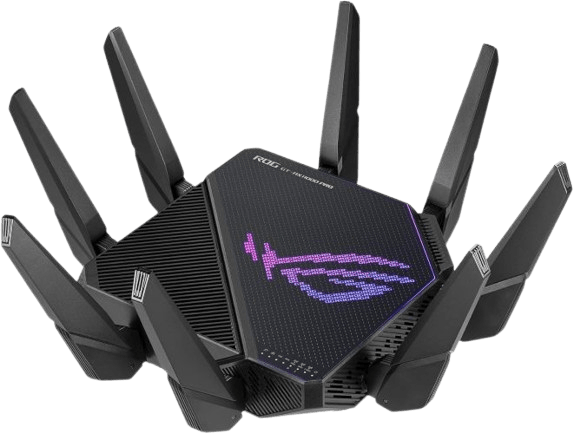
The ASUS ROG Rapture GT AX11000 Pro is a gaming-focused router built around Wi-Fi 6 technology. Its tri-band configuration supports multiple wireless bands, helping distribute connected devices across the network. The router includes six external antennas, ASUSWRT software, and a collection of gaming-oriented networking features. Its ROG design targets users who want a dedicated gaming router without necessarily upgrading to Wi-Fi 7. However, the supplied specifications do not clearly establish its maximum combined wireless speed or complete Ethernet configuration. The listed 1Gbps data transfer rate should not be treated as a confirmed maximum wireless speed. Its exact networking specifications should be checked before purchase.
Although newer models offer faster wireless standards, this remains one of the best ASUS routers to consider when a Wi-Fi 6 gaming setup is sufficient.
Key Specifications
| Specification | Details |
| Wi-Fi Standard | Wi-Fi 6 (802.11ax) |
| Frequency Bands | Tri-band |
| Maximum Combined Speed | Upto 11 Mbps |
| Channel Width | 160MHz |
| Operating System | ASUSWRT |
| Mesh Support | Not specified |
| Ethernet Ports | 8 listed |
| Antennas | 6 external |
| Weight | 4.81 pounds |
| Gaming Features | ROG gaming-focused networking |
Core Features
Tri-Band Wi-Fi 6: The router uses three wireless bands to distribute connected devices and network traffic. This can be useful in gaming households where computers, consoles, smartphones, and streaming devices compete for bandwidth. Its Wi-Fi 6 platform also supports more efficient wireless communication than older generations.
Gaming-Focused ROG Design: ASUS positions the ROG Rapture series for gaming-oriented networking. Its design focuses on managing network traffic and providing additional control over connections. These features are useful when gaming activity needs priority over less time-sensitive household traffic.
ASUSWRT Management: ASUSWRT provides the router’s network configuration and management interface. Users can access wireless settings, network controls, and supported security options through the router software.
Six External Antennas: The six-antenna design supports wireless signal distribution across the connected environment. Antenna placement can influence signal performance, although coverage also depends on walls, interference, and the router’s location.
Wired Connectivity: The supplied specifications list eight ports. However, their exact configuration and speeds are not clearly established in the available product details. The port arrangement should be confirmed before selecting this router for a multi-gigabit network.
Why You’ll Like It
Gaming Design: Its ROG positioning targets users who want gaming-focused networking.
Tri-Band Wi-Fi: Three wireless bands provide additional network flexibility.
External Antennas: Six antennas support wireless signal distribution.
ASUSWRT Software: Provides network configuration and management options.
What You Should Consider
Older Standard: It does not support Wi-Fi 7.
Port Verification: Its exact Ethernet configuration requires confirmation.
Best For
Gaming households that prefer a Wi-Fi 6 platform and want a router from ASUS’s ROG lineup. It is important to verify its detailed hardware specifications before choosing it over newer alternatives.
Price: $209.00
7. ASUS ROG Strix GS BE12000: Best Tri-band ASUS Router

The ASUS ROG Strix GS-BE12000 combines tri-band Wi-Fi 7 with an extensive 2.5Gbps Ethernet configuration. Its advertised combined wireless throughput reaches 12Gbps, supported by 320MHz channels, Multi-Link Operation, and 4K-QAM. The router includes one 2.5Gbps WAN port and seven 2.5Gbps LAN ports, providing several options for connecting gaming PCs, NAS systems, and other wired devices. A quad-core 2.0GHz processor and 2GB of RAM handle networking operations, while Triple-Level Game Acceleration and Smart Home Master add gaming and network management features. However, the supplied product information contains a model-name mismatch that should be checked before purchasing.
This combination makes it one of the best ASUS routers to examine when a gaming network needs several multi-gigabit wired connections.
Key Specifications
| Specification | Details |
| Wi-Fi Standard | Wi-Fi 7 (802.11be) |
| Frequency Bands | Tri-band |
| Maximum Combined Speed | Up to 12Gbps |
| Channel Width | Up to 320MHz |
| Processor | Quad-core 2.0GHz |
| RAM | 2GB |
| Mesh Support | ASUS AiMesh |
| Ethernet Ports | 1 × 2.5G WAN, 7 × 2.5G LAN |
| Antennas | 8 internal |
| Dimensions | 8.9 × 3.5 × 8.9 inches |
Core Features
Tri-Band Wi-Fi 7: The GS-BE12000 supports 2.4GHz, 5GHz, and 6GHz wireless bands. Its advertised 12Gbps combined speed provides substantial theoretical capacity for demanding home networks. The 320MHz channel support and 4K-QAM modulation can improve wireless throughput when compatible devices and suitable signal conditions are available.
Eight 2.5G Ethernet Connections: The router provides one 2.5Gbps WAN port and seven 2.5Gbps LAN ports. This arrangement is particularly useful for gaming setups with several wired devices. Gaming PCs, consoles, network storage, and other compatible equipment can connect directly without requiring a separate multi-gigabit switch.
Triple-Level Game Acceleration: ASUS includes its gaming traffic optimization technology to prioritize network activity associated with gaming. This can help manage congestion when multiple devices compete for bandwidth. However, it does not guarantee lower ping in every situation because external server distance and ISP routing remain important factors.
Smart Home Master: The feature supports up to three SSIDs for organizing different network environments. Users can separate IoT devices and other equipment according to their networking needs. This can help simplify management in households with many connected devices.
Quad-Core Processing: The router uses a 2.0GHz quad-core processor and 2GB of RAM. These components support network management, wireless communication, and its additional gaming features.
Why You’ll Like It
Multi-Gigabit Ethernet: Eight 2.5G connections provide extensive wired networking options.
Wi-Fi 7: Tri-band wireless connectivity supports modern Wi-Fi features.
Gaming Optimization: Triple-Level Game Acceleration provides additional traffic management.
Strong Hardware: Its quad-core processor and 2GB RAM support demanding networking tasks.
What You Should Consider
Port Requirements: Multi-gigabit connections require compatible devices and cables.
Unused Capacity: Smaller households may not benefit from all eight 2.5G ports.
Best For
Gaming enthusiasts and power users who need several wired multi-gigabit connections alongside Wi-Fi 7. It is particularly suitable for gaming PCs, consoles, streaming equipment, and network storage.
Price: $314.99
8. ASUS ROG Strix GS BE18000: Best High-Speed ASUS Router

The ASUS ROG Strix GS BE18000 is presented as a gaming-oriented router with tri-band connectivity and 6GHz support. Its supplied specifications list a combined data transfer rate of 11,259Mbps, eight antennas, and nine Ethernet ports. The product title identifies Wi-Fi 7, while the detailed specification table lists Wi-Fi 6E. This is an important difference because the two standards offer different capabilities. Its listed 2.5Gbps LAN bandwidth and ASUSWRT management software add useful networking options. However, the exact wireless generation and throughput should be confirmed through the manufacturer’s official specifications before purchase.
Key Specifications
| Specification | Details |
| Wi-Fi Standard | Wi-Fi 7 |
| Frequency Bands | Tri-band |
| Maximum Combined Speed | 11.259Gbps |
| Frequency Support | 6GHz |
| Operating System | ASUSWRT |
| Ethernet Ports | 9 |
| LAN Port Speed | 2.5Gbps |
| Antennas | 8 |
Core Features
Tri-Band Connectivity: The router is listed with 2.4GHz, 5GHz, and 6GHz connectivity. Three wireless bands provide additional options for distributing network traffic. The 6GHz band can offer access to less congested wireless spectrum, although its effective range depends on physical obstructions and placement.
6GHz Frequency Support: The 6GHz band is particularly useful for compatible devices that need additional wireless bandwidth. It can help reduce competition with devices operating on the 2.4GHz and 5GHz bands. However, users need compatible client hardware to take advantage of this frequency.
ROG Gaming Design: ASUS positions the ROG Strix range for gaming-oriented networking. The product’s tri-band configuration and multi-gigabit connectivity are relevant to households with gaming computers, consoles, and other bandwidth-intensive devices.
Multiple Ethernet Connections: The supplied specifications list nine Ethernet ports and 2.5Gbps LAN bandwidth. This can provide flexibility for connecting multiple wired devices. However, the precise port arrangement should be confirmed before purchasing.
ASUSWRT and Wireless Security: ASUSWRT provides access to network configuration and management features. WPA3 and WPA2 security options are also listed, giving users different wireless security configurations.
Why You’ll Like It
Tri-Band Support: Three wireless bands provide additional connectivity flexibility.
6GHz Access: Compatible devices can use additional wireless spectrum.
Multi-Gigabit LAN: The 2.5Gbps LAN capability supports faster wired networking.
External Antennas: Eight antennas support wireless signal distribution.
What You Should Consider
Speed Verification: The11.259Gbps throughput needs confirmation.
Unclear Ports: The exact configuration of its nine ports is not provided.
Best For
Users comparing tri-band ROG routers and looking for 6GHz wireless connectivity. However, the exact Wi-Fi generation and Ethernet configuration must be verified before purchasing.
Price: $299.99
9. ASUS RT AX3000S: Best ASUS WiFi 6 Router

The ASUS RT AX3000S is a practical option for households that want Wi-Fi 6 without spending money on premium gaming or Wi-Fi 7 hardware. Its dual-band configuration supports combined theoretical speeds of up to 3Gbps, with 574Mbps on 2.4GHz and 2,402Mbps on 5GHz. It also supports MU-MIMO and OFDMA to help manage multiple connected devices. AiMesh compatibility allows users to expand coverage with compatible ASUS routers, while parental controls and VPN functionality provide additional network management options. With four antennas and advertised coverage of up to 2,250 square feet, it offers a useful balance of everyday connectivity and affordability.
Key Specifications
| Specification | Details |
| Wi-Fi Standard | Wi-Fi 6 (802.11ax) |
| Frequency Bands | Dual-band |
| Maximum Combined Speed | Up to 3Gbps |
| 2.4GHz Speed | Up to 574Mbps |
| 5GHz Speed | Up to 2,402Mbps |
| Mesh Support | ASUS AiMesh |
| LAN Port Speed | Up to 1Gbps |
| Antennas | 4 |
| Dimensions | 5.3 × 2.2 × 9.1 inches |
| Weight | 14.4 ounces |
Core Features
Dual-Band Wi-Fi 6: The router operates on 2.4GHz and 5GHz frequencies. Its advertised combined throughput reaches 3Gbps, with individual theoretical speeds of up to 574Mbps and 2,402Mbps. This configuration provides sufficient theoretical bandwidth for everyday browsing, streaming, video calls, and compatible smart home devices.
OFDMA and MU-MIMO: These technologies improve how a router manages wireless communication with multiple devices. OFDMA can divide a wireless channel into smaller resource units, allowing several devices to communicate more efficiently. MU-MIMO helps the router communicate with multiple compatible clients simultaneously.
AiMesh Compatibility: The RT-AX3000S supports ASUS AiMesh, allowing compatible routers to work together in an expandable network. This is useful when the original router cannot provide reliable connectivity throughout the property. Additional compatible units can help reduce coverage gaps.
Parental Controls: ASUS provides network management options that allow households to manage connected devices and apply parental restrictions. These features can help organize internet access for different family members.
VPN Support: VPN functionality provides additional options for secure network connections. However, the available protocols and features depend on the router’s firmware and configuration.
Why You’ll Like It
Affordable Wi-Fi: Its 3Gbps theoretical combined rating offers useful capacity for everyday networking.
Device Management: OFDMA and MU-MIMO help manage multiple connected devices.
Mesh Expansion: AiMesh allows compatible ASUS routers to extend coverage.
Security Options: Parental controls and VPN support add useful network management features.
What You Should Consider
No 6GHz Band: Its dual-band configuration does not include the additional 6GHz frequency.
Gigabit LAN: The supplied specifications list LAN speeds up to 1Gbps.
Best For
Apartments, small-to-medium homes, and families looking for affordable Wi-Fi 6 connectivity. It is also a practical option for users want to expand their ASUS network through AiMesh later.
Price: $89.99
10. ASUS RT AX1800S: Best Budget ASUS Router
The ASUS RT AX1800S is an entry-level dual-band Wi-Fi 6 router designed for everyday home networking. Its combined theoretical wireless speed reaches 1.8Gbps, while five Gigabit Ethernet ports provide wired connectivity for computers, televisions, and gaming consoles. It supports MU-MIMO and OFDMA to help manage multiple wireless devices. ASUS also includes AiProtection Classic, Instant Guard VPN functionality, and AiMesh compatibility. Its four external antennas support wireless signal distribution, making it a practical choice for basic home networking. Although it lacks Wi-Fi 7 and multi-gigabit Ethernet, its affordable price makes it an attractive option for budget-conscious households.
Key Specifications
| Specification | Details |
| Wi-Fi Standard | Wi-Fi 6 (802.11ax) |
| Frequency Bands | Dual-band |
| Maximum Combined Speed | Up to 1.8Gbps |
| 5GHz Speed | Up to 1,201Mbps |
| Processor | Dual-core |
| Mesh Support | ASUS AiMesh |
| Ethernet Ports | 1 WAN, 4 LAN |
| Ethernet Speed | Gigabit |
| Dimensions | 9.06 × 5.28 × 2.2 inches |
| Weight | 13.1 ounces |
Core Features
Wi-Fi 6 Connectivity: The RT-AX1800S supports Wi-Fi 6 with a combined theoretical wireless speed of up to 1.8Gbps. It uses 2.4GHz and 5GHz bands, making it suitable for everyday home activities such as browsing, video streaming, and video conferencing.
OFDMA and MU-MIMO: These technologies help the router manage simultaneous wireless connections. OFDMA allows multiple devices to share wireless channel resources more efficiently, while MU-MIMO helps communicate with multiple compatible clients. Together, they can improve network efficiency in households with several connected devices.
Five Gigabit Ethernet Ports: The router includes one WAN port and four LAN ports. This makes it possible to connect wired equipment such as desktop computers, smart TVs, and gaming consoles. Gigabit Ethernet also provides a more consistent connection for devices that benefit from avoiding wireless interference.
AiProtection Classic: ASUS includes AiProtection Classic for network security. Powered by Trend Micro according to the supplied information, it provides protection features intended to help identify malicious network activity and unsafe connections.
AiMesh and Instant Guard: AiMesh compatibility allows the router to work with compatible ASUS devices to expand coverage. Instant Guard provides VPN functionality for secure remote connections. These additional features give the router more flexibility than a basic entry-level wireless device.
Why You’ll Like It
Low Price: Its $61.99 listed price makes Wi-Fi 6 more accessible.
Wired Connections: Five Gigabit ports support several wired devices.
Network Security: AiProtection Classic provides additional network protection.
Mesh Compatibility: AiMesh allows users to expand coverage with compatible ASUS equipment.
What You Should Consider
Limited Speed: Its 1.8Gbps combined theoretical rating is lower than more advanced ASUS models.
No 6GHz: The dual-band configuration does not support the 6GHz frequency.
Basic Hardware: Its entry-level configuration is not designed for demanding multi-gigabit networks.
Best For
Budget-conscious households, apartments, and everyday internet users. It is particularly useful when basic Wi-Fi 6 connectivity, Gigabit Ethernet, and essential security features matter more than advanced networking performance.
Price: $61.99
WiFi 6 vs. 7 vs. 8: Speed, Range & Features Compared
Wireless networking continues to evolve, bringing improvements in throughput, channel capacity, and network efficiency. However, buying the newest standard does not automatically mean getting the best experience.
Wi-Fi 6 remains suitable for many everyday networks, while Wi-Fi 7 introduces wider channels and Multi-Link Operation. Wi-Fi 8 focuses on further improvements in reliability and performance, although its commercial implementation and product availability require careful verification.
Maximum Speed and Bandwidth
Maximum theoretical speed is one of the biggest differences between Wi-Fi generations.
Wi-Fi 6 supports a theoretical maximum aggregate rate of 9.6Gbps. Wi-Fi 7 increases that theoretical maximum to approximately 46Gbps under its full specification. These figures represent theoretical aggregate capabilities, not the speed a single device will necessarily achieve.
Wi-Fi 7 achieves higher theoretical throughput through wider channels, higher-order modulation, and Multi-Link Operation. Its support for 320MHz channels and 4096-QAM allows compatible devices to transfer more data under suitable conditions.
Wi-Fi 8 is associated with the IEEE 802.11bn development effort. Its focus includes improving reliability and performance in challenging wireless environments rather than simply increasing headline speed. However, advertised Wi-Fi 8 router specifications should be independently verified.
Frequency Bands and Channel Width
Frequency bands determine how wireless signals operate and how much spectrum is available for communication.
Wi-Fi 6 and Wi-Fi 7 support the 2.4GHz and 5GHz bands, while Wi-Fi 6E extends Wi-Fi 6 into the 6GHz band. Wi-Fi 6 supports channel widths up to 160MHz and 1024-QAM modulation, whereas Wi-Fi 7 increases these limits to 320MHz and 4096-QAM for higher data capacity and efficiency. Wi-Fi 8 is intended to retain compatibility across these frequency bands, with further efficiency improvements, but its final specifications remain subject to standardization.
Wi-Fi 7 supports all three bands and introduces wider 320MHz channels. This provides more spectrum for compatible devices, particularly in environments with high network traffic.
The 6GHz band can offer cleaner wireless channels, but it has different propagation characteristics from 2.4GHz. Physical obstructions can reduce its usable range.
Latency and Multi-Link Operation
Latency matters when network responsiveness is important. Online gaming, video calls, cloud applications, and remote desktop sessions can all benefit from lower and more consistent network delays.
Wi-Fi 6 introduced technologies such as OFDMA and improved scheduling to manage network traffic efficiently. Wi-Fi 7 builds on this foundation with Multi-Link Operation.
MLO allows compatible devices to communicate across multiple wireless links or bands. Depending on the implementation and network conditions, this can improve throughput, reliability, and responsiveness.
Wi-Fi 8 development places greater emphasis on reliable communication and consistent performance in difficult environments. However, real-world results will depend on the router, client hardware, software implementation, and network conditions.
Range, Stability, and Network Reliability
A router’s wireless generation does not determine its coverage by itself.
A Wi-Fi 7 router with suitable antennas and positioning may provide better coverage than a poorly positioned router using a newer standard. Similarly, walls, floors, appliances, and neighboring wireless networks can affect signal strength.
Wi-Fi 6 remains a practical choice for many homes because it supports efficient connections across numerous devices.
Wi-Fi 7 adds the 6GHz band, wider channels, and MLO. These improvements can provide more flexible network operation, although higher-frequency signals may have difficulty passing through thick walls.
Wi-Fi 8’s development goals include improved reliability under challenging conditions. Still, buyers should evaluate actual product specifications rather than relying on the generation number alone.
For large properties, an ASUS AiMesh system or dedicated ZenWiFi package may provide a more meaningful improvement than replacing one powerful router with another.
Device Compatibility and Upgrade Value
Your connected devices determine how much benefit you receive from a new router.
A Wi-Fi 7 router can support older Wi-Fi clients, but those devices will continue operating according to their own wireless capabilities. To use features such as 320MHz channels and MLO, compatible client hardware is necessary.
Wi-Fi 6 routers remain a sensible choice for users with older smartphones, laptops, and smart home devices.
Meanwhile, Wi-Fi 7 is more attractive when purchasing newer computers, flagship smartphones, and compatible networking equipment.
Wi-Fi 8 requires additional caution. Before buying an advertised Wi-Fi 8 router, verify its official certification, client compatibility, and actual feature support.
Which generation offers the best value?
- Wi-Fi 6: Suitable for everyday networking and budget upgrades.
- Wi-Fi 7: Better suited to high-bandwidth households and newer devices.
- Wi-Fi 8: Worth monitoring, but verify actual product availability and certification before purchasing.
Why Choose an ASUS Router?
ASUS offers routers for different networking requirements, including gaming, streaming, remote work, and whole-home connectivity. Its product range includes budget-friendly RT models, gaming-focused ROG hardware, and mesh-oriented ZenWiFi systems.
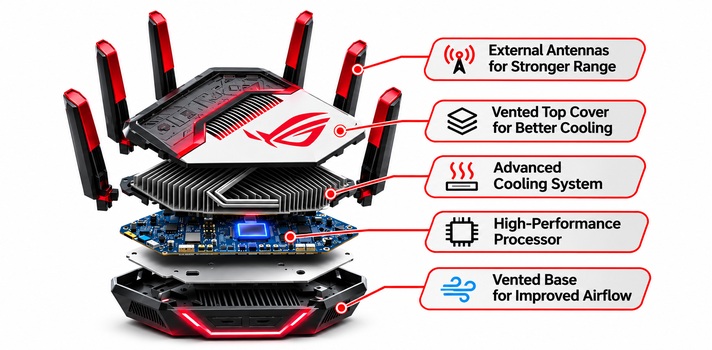
Faster WiFi Speeds
ASUS offers wireless routers across Wi-Fi 6, Wi-Fi 6E, and Wi-Fi 7 product categories. Higher-end models support technologies such as 320MHz channels, 4096-QAM, and Multi-Link Operation.
These features can improve theoretical wireless throughput for compatible devices. Moreover, ASUS offers several multi-gigabit Ethernet options for users with high-speed internet connections and wired networking equipment.
Wider Whole Home Coverage
Coverage is important when a router needs to serve several rooms or floors.
ASUS AiMesh allows compatible routers to work together as an expandable wireless network. Instead of relying on one central device, users can add additional nodes to improve connectivity in distant areas.
The ZenWiFi series takes this concept further with dedicated mesh packages. Models such as the BQ16 Pro are designed for larger properties where one router may struggle to provide consistent coverage.
Low Latency Gaming Performance
ASUS ROG routers include gaming-oriented networking features designed to prioritize gaming traffic.
Depending on the model, features may include dedicated gaming ports, Triple-Level Game Acceleration, and gaming-focused traffic management.
These tools can help manage network congestion. However, a gaming router cannot fix latency caused by distant game servers, poor ISP routing, or an unstable internet connection.
Advanced Network Security
Network security is another important consideration.
Selected ASUS models include AiProtection, parental controls, VPN support, and WPA3 security. Some also offer Guest Network Pro or Smart Home Master features to separate different categories of connected devices.
These options help users manage their networks and reduce unnecessary exposure between devices.
Security also depends on regular firmware updates, strong passwords, and correct router configuration.
Options for Every Budget
ASUS provides routers at several price levels.The RT-AX1800S offers entry-level Wi-Fi 6 connectivity, while the RT-AX3000S provides a higher theoretical speed rating. Users who want newer wireless technology can consider models such as the RT-BE9700 and RT-BE88U.
At the premium end, ROG and ZenWiFi models target gaming enthusiasts and large households.This variety makes it easier to select a router based on actual networking requirements rather than paying for features that may never be used.
What Should You Consider Before Buying an ASUS Router?
Choosing the right router involves more than comparing advertised speeds. When evaluating the best ASUS routers, consider your internet plan, home size, connected devices, and networking requirements before selecting a model.
Wi Fi 6, Wi Fi 7, or Wi Fi 8
Wi-Fi 6 handles everyday networking, while Wi-Fi 7 adds 320MHz channels, 4096-QAM, and Multi-Link Operation (MLO) for compatible devices. Wi-Fi 8 is an emerging standard, so verify its specifications and commercial availability before purchasing.
If most connected devices use Wi-Fi 5 or Wi-Fi 6, an expensive Wi-Fi 7 router may not deliver its full potential immediately. Choose a newer standard when you plan to upgrade your devices or need additional network capacity.
Wireless Speed and Bandwidth
Check the router’s combined speed rating and individual band specifications. A 9.7Gbps rating represents theoretical combined wireless capacity, not the speed one laptop will automatically receive.
Also, consider your broadband plan. A 1Gbps connection rarely requires a 30Gbps router unless demanding local networking, multiple devices, or other advanced requirements justify the extra capacity.
Coverage Area and Antenna Design
Match the router’s coverage to your property’s size and layout. Small apartments may need a basic dual-band router, while multi-story homes may benefit from a mesh system.
External antennas offer positioning flexibility, while internal antennas provide a cleaner design. However, antenna count alone does not determine coverage. Treat advertised coverage figures as estimates.
Dual Band vs. Tri Band Connectivity
Dual-band routers use 2.4GHz and 5GHz frequencies. Tri-band models add another frequency band, commonly 6GHz on Wi-Fi 7 routers, providing additional wireless capacity.
Quad-band routers offer even more theoretical capacity. Dual-band models suit everyday networking, while tri-band and quad-band options are worth considering for busy households with demanding connectivity needs.
Gaming Features and Adaptive QoS
Look for Quality of Service (QoS), dedicated gaming ports, traffic prioritization, and network monitoring. These features help prioritize gaming traffic when multiple devices compete for bandwidth.
However, gaming features cannot eliminate every latency problem. Your ISP, game server location, wireless interference, and connection quality also affect ping and stability.
Number of Connected Devices
Count the devices regularly using your network, including smartphones, laptops, smart TVs, cameras, consoles, and smart home equipment. More active devices increase network demand.
Wi-Fi 6 and Wi-Fi 7 offer improved network efficiency for busy environments. Also, consider the router’s processor and memory when selecting equipment for a heavily connected home.
AiMesh Compatibility
ASUS AiMesh allows compatible routers to work together and expand wireless coverage. It can be useful if you already own an ASUS router and want to extend your network later.
Check compatibility before purchasing additional equipment. For larger properties, a dedicated ZenWiFi mesh package may provide a simpler setup.
Security Features and Parental Controls
Check for WPA3 encryption, AiProtection, guest network separation, parental controls, automatic firmware updates, and VPN support. These features help manage network security and access.
Also, verify whether advanced security tools require a subscription. Feature availability varies across ASUS models, so check the specifications before buying.
Ethernet Ports and Multi-Gigabit Support
Check the number and speed of WAN and LAN ports. Gigabit Ethernet suits many homes, while 2.5Gbps and 10Gbps ports benefit multi-gigabit broadband, NAS systems, and high-speed local transfers.
A router’s maximum port speed does not guarantee the same speed on every connected device. Your computer, network cable, and other equipment must also support the required connection speed.
Budget, Warranty, and Long-Term Value
Set a realistic budget before comparing models. An affordable Wi-Fi 6 router may offer better value than a premium Wi-Fi 7 model if your internet plan and devices do not require additional capacity.
Finally, consider firmware support, AiMesh compatibility, security features, warranty coverage, and regional support. These factors can help determine which of the best ASUS routers offers the strongest long-term value.
Our Top Picks
Last Chance to Upgrade! Claim Yours Today!
| Best Overall | Best for VPN | Best for Large Homes | Best for Budget |
| ASUS ROG Rapture GT BE98 Pro | ASUS RT BE9700 | ASUS ZenWiFi BQ16 Pro | ASUS RT AX1800S |
| | | |
| Quad-band Wi-Fi 7; Up to 30Gbps; 2 × 10G + 4 × 2.5G Ethernet | Tri-band Wi-Fi 7; Up to 9.7Gbps; Advanced VPN support | Quad-band Wi-Fi 7; Two-unit mesh system; Up to 8,000 sq. ft. coverage | Dual-band Wi-Fi 6; Up to 1.8Gbps; 1 WAN + 4 Gigabit LAN ports |
| $684.99 | $249.99 | $999.99 | $61.99 |
Wrap Up
Choosing among the best ASUS routers comes down to your internet plan, home size, connected devices, and networking priorities. The ASUS ROG Rapture GT-BE98 Pro is a strong overall choice for demanding gaming and multi-gigabit networking. For larger homes, the ZenWiFi BQ16 Pro offers a two-unit mesh setup designed for wider coverage. Meanwhile, the RT-BE9700 provides Wi-Fi 7 with advanced VPN features, and the RT-AX3000S delivers affordable Wi-Fi 6 connectivity.
Before making a decision, consider the wireless standard your devices support, the number of Ethernet connections you need, and whether a mesh system would improve coverage. You don’t necessarily need the most expensive model to get a reliable home network. Choose the ASUS router that matches your actual requirements and offers the right balance of speed, coverage, security, and price.
FAQs
Which is the best ASUS router in 2026?
The ASUS ROG Rapture GT-BE98 Pro is the strongest overall choice among the best ASUS routers in this roundup. It combines quad-band Wi-Fi 7, an advertised 30Gbps aggregate wireless speed, eight external antennas, and dual 10G Ethernet ports. It also includes Triple-Level Game Acceleration and AiMesh compatibility, making it suitable for demanding gaming setups and households with several high-bandwidth devices.
However, its premium price and large physical design may be excessive for smaller homes. For users who prioritize coverage, the ASUS ZenWiFi BQ16 Pro offers a two-unit mesh configuration with advertised coverage of up to 8,000 square feet. Meanwhile, the RT-AX1800S is a more affordable option for basic Wi-Fi 6 networking.
Is Wi-Fi 7 worth buying over Wi-Fi 6?
Wi-Fi 7 can be worth buying if your devices support the standard and your network requires higher wireless capacity. It introduces 320MHz channels, 4096-QAM, and Multi-Link Operation. These features can improve theoretical throughput and connection flexibility when compatible devices are available.
However, a Wi-Fi 7 router is not automatically faster for every connected device. Older laptops and smartphones will continue using their supported wireless standards. If your internet plan is relatively modest and most devices use Wi-Fi 6, an affordable Wi-Fi 6 router may provide better value.
Which ASUS router is best for gaming?
The ASUS ROG Rapture GT-BE98 Pro is the strongest gaming-oriented option in this roundup. It combines quad-band Wi-Fi 7, multi-gigabit Ethernet, and Triple-Level Game Acceleration. Its dual 10G and four 2.5G ports also provide flexibility for wired gaming systems and other high-bandwidth equipment.
The ROG Strix GS-BE12000 is another interesting option. It offers Wi-Fi 7, eight 2.5G Ethernet connections, and ROG gaming network features. For gaming, a wired Ethernet connection is generally preferable when practical because it can reduce interference and provide a more consistent connection than wireless networking.
Which ASUS router is best for a large home?
The ASUS ZenWiFi BQ16 Pro is the most coverage-focused option in this roundup. Its two-unit quad-band Wi-Fi 7 mesh package advertises coverage of up to 8,000 square feet. It also supports Ethernet backhaul, which can help maintain communication between mesh nodes in properties with thick walls or multiple floors.
However, actual coverage depends on the building layout, materials, interference, and node placement. For particularly challenging properties, carefully positioning multiple mesh nodes may provide better results than purchasing a single high-powered router.
Do ASUS routers support VPN connections?
Several ASUS routers support VPN functionality, although available protocols and features vary by model. Depending on the device, VPN options can include VPN server functionality, VPN client connections, and secure remote access. The RT-BE9700, for example, includes advanced VPN features and ASUS Instant Guard.
A VPN can help protect traffic when connecting through public networks or provide secure access to a home network while traveling. However, VPN connections may reduce internet speed because traffic passes through encryption and additional network routing. Always check the router’s supported VPN protocols and configuration options before purchasing.
Is ASUS AiMesh better than a regular Wi-Fi extender?
AiMesh and traditional Wi-Fi extenders serve similar purposes, but their networking approaches can differ. AiMesh allows compatible ASUS routers to work together as a mesh system. This can provide centralized network management and more seamless movement between access points.
A basic Wi-Fi extender typically repeats an existing wireless signal. Depending on the model and configuration, this can introduce additional latency or reduce available bandwidth. AiMesh is particularly useful for users who already own compatible ASUS equipment and want to expand coverage without replacing their existing router. However, a properly configured extender can still be a practical and affordable solution for smaller coverage problems.
When comparing the best ASUS routers, consider your coverage requirements, connected devices, and budget rather than choosing solely by advertised speed.
You May Also Like: